
Hairstyle for My Face Shape: Why a Photo Beats Guessing Your Shape
Find a hairstyle for my face shape using a clear photo. Check camera angle, hidden jawlines, and close-up distortion before trusting a hair report.
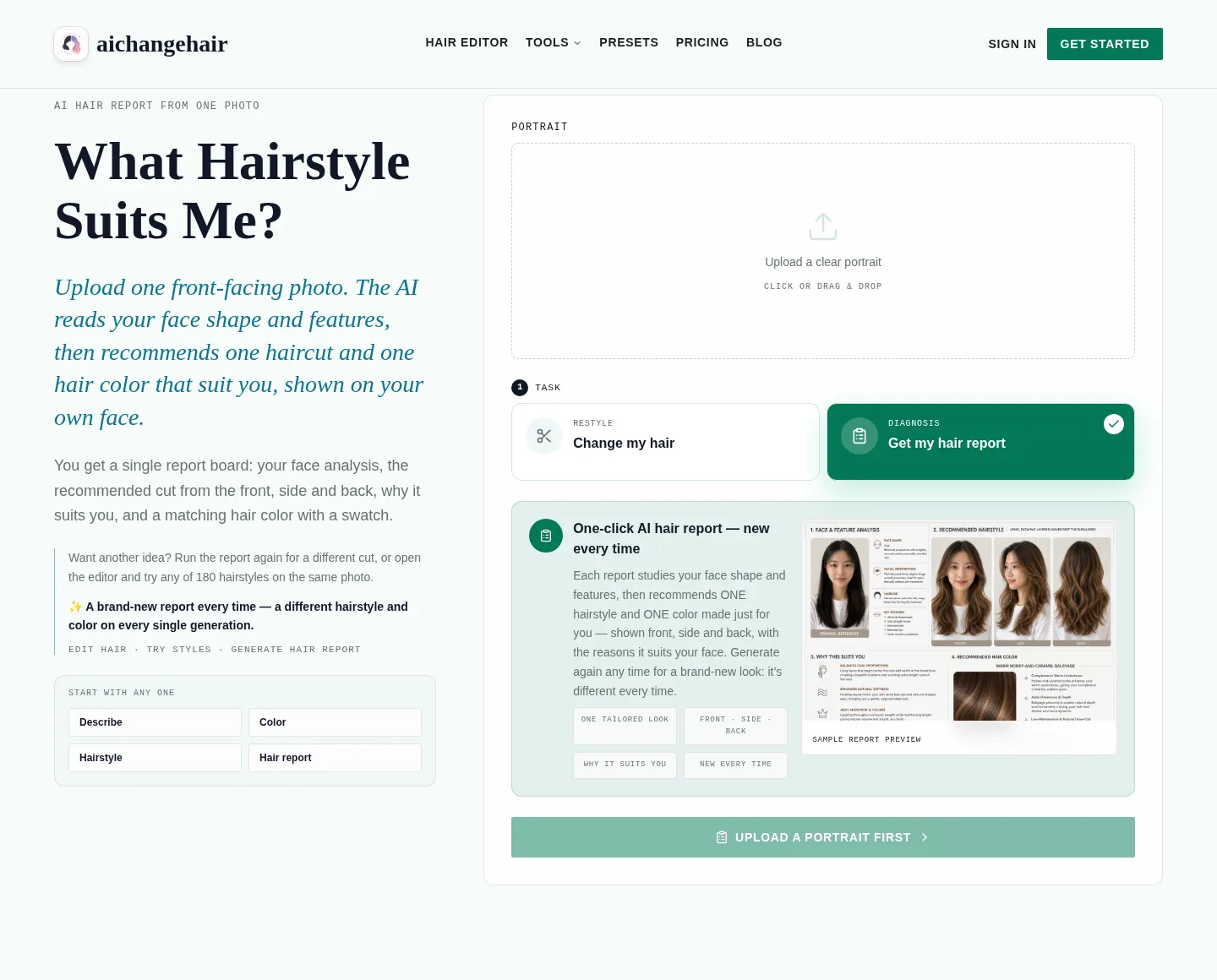
Finding a hairstyle for your face shape starts with a straight-on photo that shows your forehead, cheeks, and jaw. A mirror guess or close selfie can mislead you when angle, distance, or hair changes the visible outline. The AIChangeHair hair report offers a styling suggestion to discuss with a stylist; a clear photo makes that conversation more useful.
Last updated: October 15, 2026 · about 5 min read
Why can the same face look like different shapes?
A face-shape label describes an outline. Hair over one cheek, a tilted chin, or a camera held above eye level can change the outline you are judging. You may call one photo round and another oval without your face having changed.
That does not mean a mirror is useless. It means an unstructured glance is a poor comparison. A saved, straight-on portrait lets you revisit the same view and notice whether the forehead or jaw is hidden. It is still a photograph, with the limitations of its angle and perspective.
Avoid turning a label into a verdict. You can prefer a bob, fringe, or longer layers even when a chart suggests something else. Your real texture, preferred length, and routine matter alongside the visible shape.
What should you fix before choosing a hairstyle?
| Photo problem | What may become misleading | What to do instead |
|---|---|---|
| Camera above or below the face | Apparent balance between forehead, cheeks, and chin | Bring the camera near eye level and keep your head level |
| Head turned to one side | Width and symmetry of the visible outline | Face the camera directly |
| Hair hiding the jaw or temples | Where the face ends and hair begins | Move loose pieces aside without pulling everything tight |
| Very close selfie | Relative size of features at different distances | Move the camera farther away and keep the face centered |
| Strong side lighting | Shadows mistaken for edges | Use soft, even light |
| Beauty filter or portrait reshaping | The outline of an edited face | Use an ordinary, unfiltered photo |
You do not need a studio portrait. You need enough visible information to compare the photo with your everyday appearance. If one side of your jaw disappears into shadow, retake the picture rather than trying to measure a boundary you cannot see.
Is lens distortion the only problem?
People often use “lens distortion” to describe any unusual selfie proportions. Camera distance also changes perspective: features closer to the camera can look relatively larger. Buying a different phone or enlarging an existing close-up does not recreate a photograph taken farther away.
Rutgers' explanation of short-distance selfie distortion discusses research on apparent nasal dimensions. It supports being cautious about close-up proportions; it does not validate a face-shape classifier or establish which haircut you should choose.
Keep the practical lesson modest. Put some distance between the camera and your face, then check that the resulting portrait looks representative. Do not use one unfamiliar selfie to conclude that a feature needs correcting.
How do you take a useful photo in three steps?
- Set the frame. Face the camera with your chin level. Include the whole crown and enough of the shoulders to avoid a tight face crop. Use a plain background and soft light.
- Expose the outline. Move hair away from the cheeks and jaw while keeping the hairline visible. Remove hats and sunglasses. Leave your expression relaxed instead of stretching the face into an exaggerated smile.
- Inspect the saved image. Open the actual file. Check both temples, the lower jaw, and the forehead. If the face is blurred, tilted, or heavily filtered, take another photo before uploading.
Use a portrait of yourself or someone who agreed to its upload. Read the service's privacy policy before sharing a photo. Permission to look at a photograph is not automatically permission to upload it to a tool.
A useful photo reduces avoidable uncertainty. It cannot reveal every growth pattern, measure real hair density, or replace an in-person consultation.
How does the hair report use that photo?
As of October 15, 2026, the report workflow is to sign in, upload one clear front-facing photo, and run the report. The result is one board containing the original photo and face/feature analysis, including face shape, proportions, hairline, and key features.
The board recommends one haircut, shown on the same person from the front, side, and back, with three or four reasons. It also recommends one named hair color with a swatch. Those three haircut views are views of the same suggestion, not three different cuts. The feature page includes its own sample report so you can see the layout before uploading.
Treat the analysis as a styling suggestion. The front-facing input does not document the actual back of your head, so the side and back illustrations do not establish your real crown or neckline. Likewise, a named color is a visual direction, not a salon formula.
Another run gives a different cut and color. If you already have a direction in mind, the editor offers 180 hairstyle presets or a described cut on the same photo. You can examine a bob haircut preview or a bangs preview as a specific choice rather than requesting an entirely new recommendation.
What if the report's face-shape label seems wrong?
Check the input before changing your hairstyle decision. Is the jaw hidden? Was the camera tilted? Does the portrait look different from a normal view of you? Retake the photo if those problems are visible.
If the label still feels uncertain, use the concrete details you can assess: the amount of forehead shown, the length around the cheeks, and whether you like the outline. Our face-shape hairstyle chart explains the broader categories. You do not need to repeat the chart to decide whether one suggested fringe feels right.
Take the original and the suggestion to your stylist. Ask how the cut would work with your texture and how much styling the pictured finish would need. You can accept part of a recommendation while keeping your current length or color.
Frequently asked questions
Can a photo tell me my exact face shape?
A clear photo can help you inspect the outline, but angle, perspective, lighting, and hidden hairlines still affect the view. Use the label as a starting point for hairstyle ideas, not an exact measurement or diagnosis.
Should I pull all my hair tightly back?
Move hair away from the cheeks and jaw so the outline is visible, but avoid pulling it so tightly that your usual hairline and framing become hard to judge. Keep the crown in the frame.
Does one report recommend several haircuts?
No. One report recommends one haircut shown from the front, side, and back, with reasons and one named color with a swatch. Run another report for a different direction or use the editor for a specific variation.
Start with a photo you can trust
Use the What Hairstyle Suits Me report with a clear portrait, then discuss the suggestion with your stylist. AIChangeHair's editorial team operates the tool; the cover shows its interface, not a promised result.