
How Would I Look With Short Hair? Try It Free Before Cutting
See what you would look like with short hair for free: preview a lob, pixie and buzz cut on your own selfie, then use the chin test before you cut.

If you are asking "how would I look with short hair?", do not guess from a celebrity photo. Upload one clear selfie to an AI hairstyle changer, preview a bob, pixie, buzz cut, and shoulder-length option on your own face, then compare them side by side before you book the haircut.
Last updated: October 28, 2026 - about 9 min read
Short hair is one of the hardest changes to imagine because the risk feels permanent. A trim grows out quickly. A major cut changes your jawline, neck, face shape, styling routine, and how every outfit frames your face.
This guide gives you a practical way to test short hair before cutting, plus a checklist for deciding whether the preview is actually useful.
Start with the right short-hair range
"Short hair" can mean very different things. Do not test only one dramatic option. Compare a range from safer to bolder:
| Short-hair option | Best for testing | What it shows |
|---|---|---|
| Shoulder-length cut | A low-risk first step | Whether you like less length |
| Long bob / lob | Most face shapes | Neckline, jaw, and styling balance |
| Chin-length bob | Stronger shape change | How much width sits near the jaw |
| Pixie cut | Bold short cut | Face, cheekbone, and hairline focus |
| Buzz cut | Most dramatic test | Full face and head-shape visibility |
The fastest method is to test the shortest realistic option first. If the buzz cut or pixie feels too bold, step back to a bob or lob. If it looks surprisingly good, the safer cuts will feel less scary.
What would I look like with short hair? See it on your own face
The quickest honest answer is a side-by-side of the same selfie at several lengths, because one flattering preview can fool you and a grid cannot.
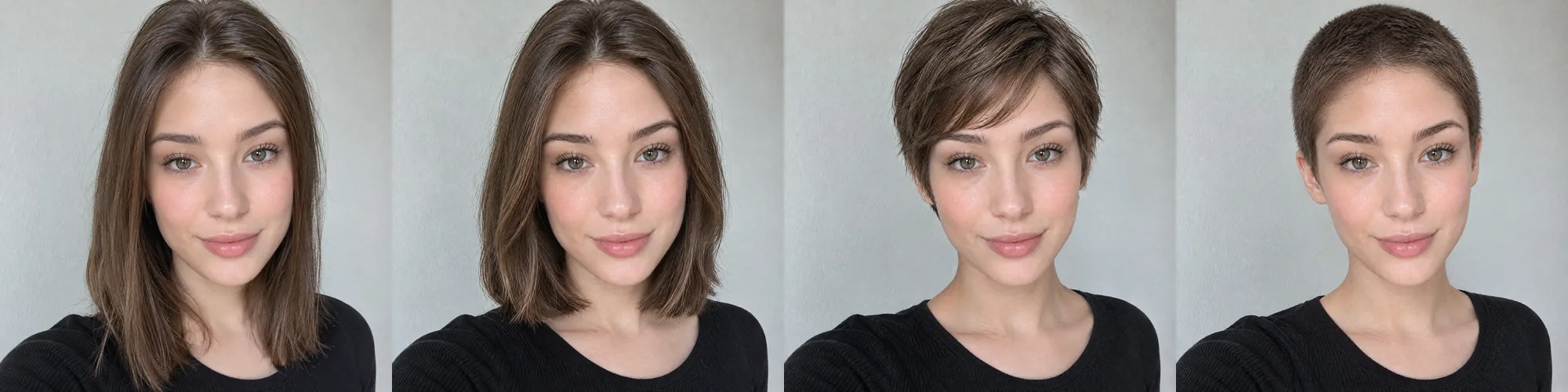
One test selfie (AI-generated, not a real customer), three short options in AIChangeHair: long bob, textured pixie and a #2 buzz cut. Each took a minute or two; the face, makeup, top and background stay the same, so only the length is doing the work.
Seeing all three next to your current length tells you more in a minute than a week of imagining. If even the long bob feels like too much, short hair may not be for you right now; if the pixie looks right, you can book with confidence.
How to tell if short hair will suit you: the chin test
Stylists often use a quick measurement, known as the 2.25-inch rule, to judge whether a very short cut will flatter your jawline.
- Hold a pencil horizontally under your chin, touching it.
- Hold a ruler vertically against your earlobe, so it meets the pencil.
- Measure from the earlobe to the pencil.
| Distance from earlobe to pencil | What it suggests | Test this first |
|---|---|---|
| Under 2.25 inches (about 5.7 cm) | Your jawline can carry very short hair | Pixie or buzz cut |
| About 2.25 inches | Most short cuts can work | Chin-length bob |
| Over 2.25 inches | Length below the jaw usually balances the face | Long bob or shoulder-length |
Treat the result as a starting point, not a verdict. Hair texture changes the picture too:
- Fine, straight hair: blunt bobs look fuller; very long layers can look thin.
- Thick hair: short cuts need internal layers or they puff out at the sides.
- Curly hair: curls shrink, so a cut that looks chin-length wet may sit higher dry.
- Cowlicks at the crown or hairline: pixies and buzz cuts show them more.
Then check the measurement against a preview on your own face, which shows the texture and hairline the ruler cannot.
How to preview short hair in 3 steps
You do not need a salon appointment to narrow down the decision.
- Take a clean selfie. Face the camera, use daylight or soft indoor light, and pull hair away from your face enough that your jawline and neck are visible.
- Generate several short styles. Start with a bob, a pixie, and one very short option. You can browse short hairstyles, bob haircuts, and pixie haircuts for direction.
- Compare the previews together. Do not judge one image alone. Put the looks side by side and ask which one still feels like you after a minute of looking.
A single flattering preview can be misleading. A comparison grid is more honest because it shows whether you like short hair in general or only one specific image.
What to check before you cut
Short hair changes more than length. Use this checklist while looking at the preview:
- Face balance: Does the cut make your face feel longer, wider, softer, or sharper?
- Jawline and neck: Short hair exposes the lower face more. Do you like that framing?
- Hair density: Fine hair may look fuller in a blunt bob; very thick hair may need layers.
- Styling time: Some short cuts need more daily shaping than long hair.
- Grow-out tolerance: A pixie and buzz cut have longer awkward grow-out phases than a bob.
- Personal style: The cut should fit your clothes, makeup habits, and work environment.
None of these points is a rule. They are prompts for noticing what changes when the length disappears.
Which short cut should you test first?
If you do not know where to start, use your current face shape as a loose guide:
| If you want to... | Test this first | Why |
|---|---|---|
| Keep some softness | Long bob | It shortens the look without exposing everything |
| Highlight cheekbones | Pixie cut | It brings attention upward |
| Make fine hair look fuller | Blunt bob | The edge can make the hair read thicker |
| Try a clean, low-maintenance look | Buzz cut | It removes styling variables |
| Avoid a drastic jump | Shoulder-length cut | It lets you test shorter without going all-in |
If you are curious about going very short, use the buzz cut filter as a neutral preview. It is not a verdict on whether you should shave your head. It simply lets you see the look before clippers make the decision real.
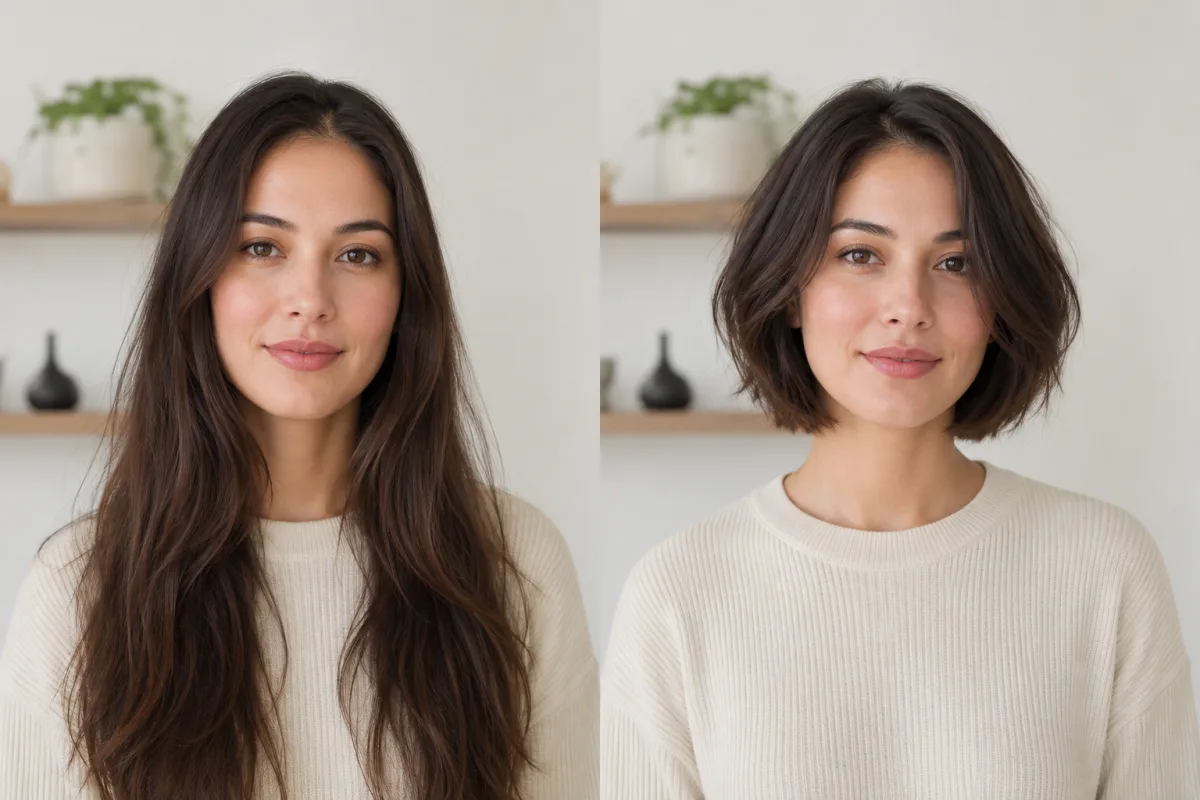 a natural before/after showing long hair changed to a short bob on the same face.
What makes a short-hair preview realistic?
A good preview should preserve your actual face, skin tone, lighting, and expression. It should change the haircut, not invent a new person.
Watch for these warning signs:
- The face shape changed.
- The hairline moved too far forward or back.
- The ears or neck look distorted.
- The haircut ignores your head angle.
- The style looks like a pasted wig.
If that happens, use a cleaner photo and try again. Pull hair back from the face, avoid heavy filters, and keep the prompt focused on one style.
Should you show the preview to your stylist?
Yes, but use it as a conversation starter, not an exact blueprint. Bring your favorite preview and ask your stylist:
- Can my hair texture support this shape?
- What would need to change for my density or cowlicks?
- How much styling will this require?
- What will the grow-out look like?
A preview helps you say "this is the direction I like." Your stylist helps translate it into a cut that works in real life.
Frequently asked questions
How can I see what I would look like with short hair?
Upload a clear selfie to an AI hairstyle changer and preview several short styles on your own face. Compare a bob, pixie, buzz cut, and shoulder-length option side by side before deciding.
Would short hair suit my face?
It depends on the cut, not just your face shape. Round, square, oval, heart, and long faces can all wear short hair, but they need different balance. Previewing styles on your own photo is more useful than following one rule.
Should I cut my hair short or try a bob first?
If you are nervous, test a lob or bob first. It gives you the short-hair feeling without the full commitment of a pixie or buzz cut. If the preview looks too safe, test shorter.
Can I preview a pixie or buzz cut?
Yes. Use an AI hairstyle changer for pixies and the buzz cut filter for very short cuts. A preview is especially useful for dramatic changes because it lets you react before anything is cut.
Will I look good with short hair?
Try the chin test first: if your earlobe-to-chin distance is under about 2.25 inches, very short cuts tend to flatter. Then preview a long bob, pixie and buzz cut on your own selfie and keep the one that still feels like you.
Is there a free short hair filter?
Yes. AIChangeHair is free to start in your browser: sign in with Google, claim 10 free credits a day, and preview a short cut from a description such as "chin-length bob" or "textured pixie."
Related guides
Test short before you cut
Short hair can be a great decision, but it should not be a blind one. Upload one selfie to the AI hairstyle changer, compare a few short options, and bring your favorite preview to the salon.