
Blonde Hair Filter: Preview Blonde Hair Before Dyeing
Use a blonde hair filter to preview platinum, ash, beige, honey, golden, and caramel blonde on your own photo before you book a salon appointment.
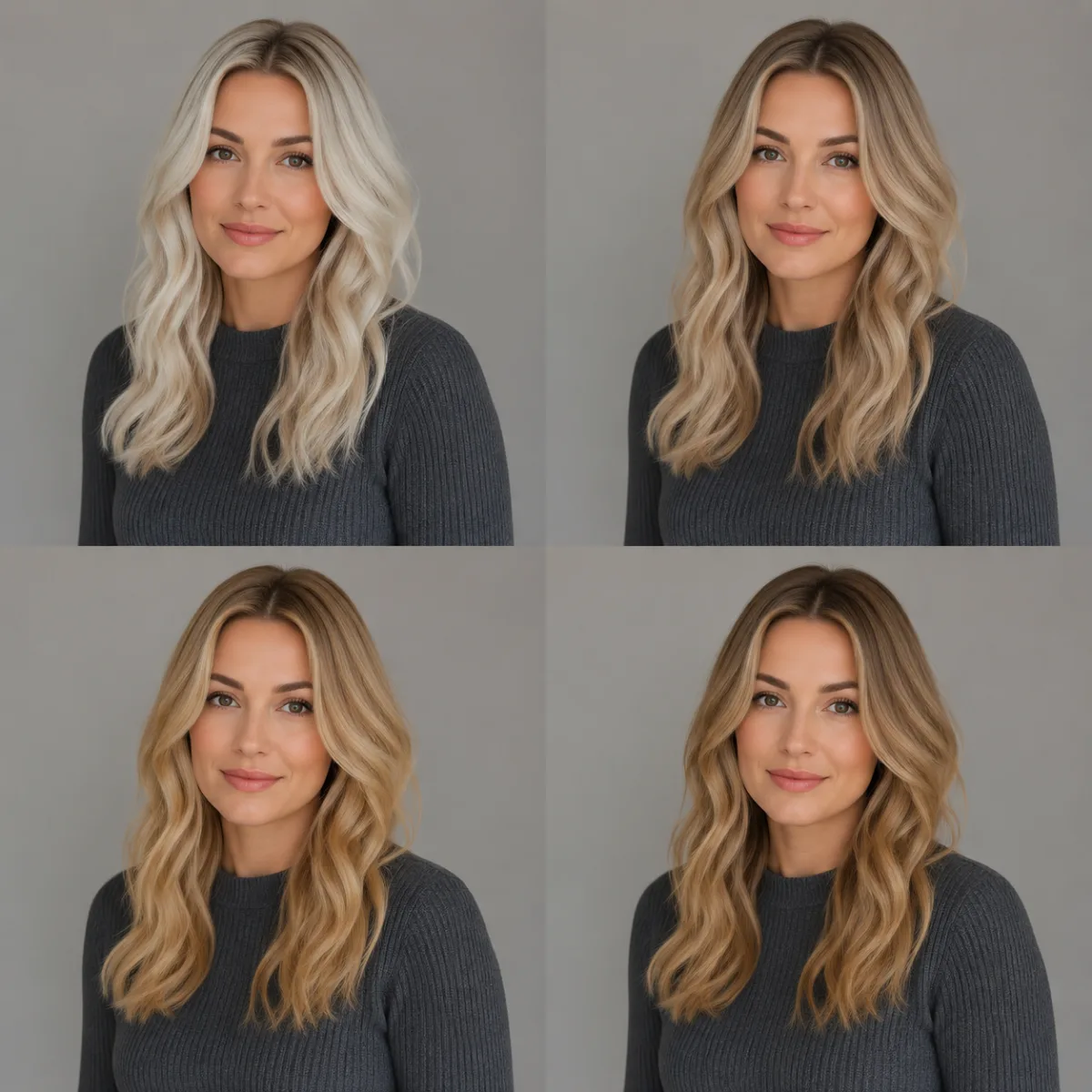
A blonde hair filter lets you see yourself with blonde hair before bleach, toner, or salon color. The important part is not just going lighter. It is comparing cool platinum, ash, beige, honey, golden, and caramel blonde against your own skin tone and current haircut.
Last updated: June 30, 2026 - about 7 min read
Blonde is not one color. The wrong blonde can look flat, gray, yellow, or too harsh. The right blonde can brighten your face and make a haircut feel completely new. A filter gives you a low-risk way to test the direction before you spend money or damage your hair with bleach.
This guide shows how to preview blonde shades and what to check before you dye.
Pick the blonde family first
Before you test exact shades, choose the broad family:
| Blonde family | Tone | Often suits | Watch out for |
|---|---|---|---|
| Platinum blonde | Very light, cool | Cool or neutral undertones | Can look severe or high-maintenance |
| Ash blonde | Cool, smoky | Pink or rosy undertones | Can look gray on warm skin |
| Beige blonde | Soft neutral | Neutral undertones | May feel too subtle if you want contrast |
| Honey blonde | Warm and golden | Warm undertones | Can turn brassy if overdone |
| Golden blonde | Bright warm blonde | Peachy or golden undertones | Needs tone control |
| Caramel blonde | Deeper warm blonde | Medium or warm skin tones | Can read brown if too dark |
If you do not know your undertone, read the hair color for skin tone guide first. Then come back and preview the blonde family that matches it.
How to use a blonde hair filter in 3 steps
You can test blonde in under a minute:
- Upload a clear portrait. Use even light and keep your hair visible. Avoid strong color filters because they distort the way blonde reads against your skin.
- Start with two opposites. Try one cool blonde, such as ash or platinum, and one warm blonde, such as honey or caramel. The contrast makes the better direction obvious.
- Narrow to the exact shade. Once you know warm or cool, test nearby shades. Beige, buttery, golden, ash, and strawberry-blonde variations can all look different on the same face.
Do not judge blonde from a store swatch or someone else's selfie. Blonde reflects onto your face, so the only preview that matters is the shade on your own photo.
The AI hair color changer can also test brunette, copper, black, pink, and gray, but blonde deserves its own pass because lightening changes contrast more than most colors.
Cool blonde vs warm blonde
The fastest way to avoid the wrong shade is to compare cool and warm side by side.
Cool blonde usually includes platinum, ash, icy beige, and mushroom tones. It can look clean and expensive on cool or neutral skin, but it may drain warm skin.
Warm blonde includes honey, golden, caramel, buttery, and strawberry tones. It can make warm skin glow, but it can look yellow or brassy if the shade is too intense.
| If the preview makes your skin look... | Try this next |
|---|---|
| Gray or tired | Warmer blonde |
| Too yellow or orange | Cooler blonde |
| Washed out | Deeper blonde or lowlights |
| Harsh around the face | Softer beige or root shadow |
| Natural but dull | Add brightness around the face |
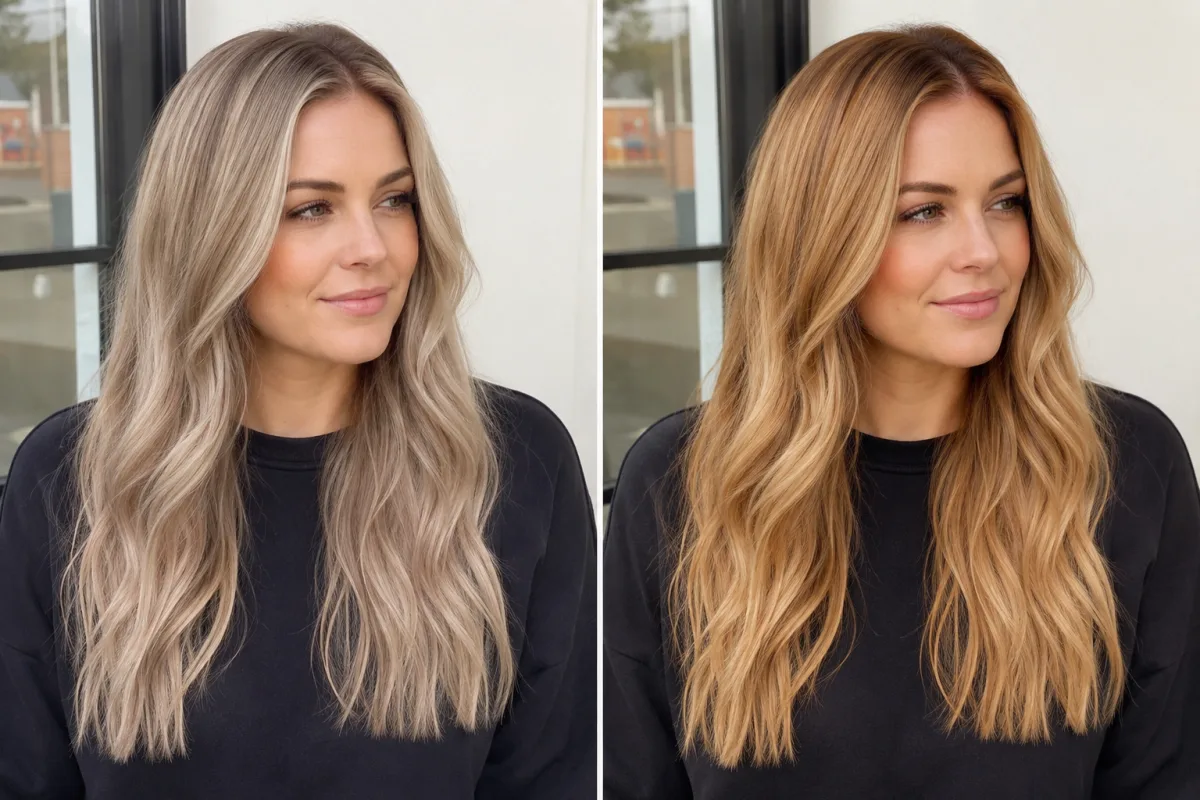 the same portrait in cool ash blonde and warm honey blonde to make undertone differences visible.
What a blonde preview cannot tell you
A filter can show whether the color direction flatters your face. It cannot fully predict salon lift, hair health, or maintenance. Dark hair may need multiple sessions to reach pale blonde safely. Previously dyed hair can lift unevenly. Curly or fragile hair may need a gentler plan.
Use the preview to pick the direction, then ask a stylist:
- How many sessions would this take?
- Will my current color lift cleanly?
- Do I need a root shadow or lowlights?
- How often will toner or touch-ups be needed?
- Can my hair handle this level of bleach?
Blonde is a color decision and a maintenance decision. The preview helps with the first part. A stylist helps with the second.
Blonde prompt examples
If the tool allows text input, be specific:
- "cool ash blonde, keep the same haircut and face"
- "warm honey blonde with natural roots"
- "soft beige blonde, not yellow"
- "caramel blonde balayage, preserve skin tone and lighting"
- "platinum blonde, realistic salon color, no gray cast"
Avoid vague prompts like "make me blonde." That can return a generic yellow shade instead of the tone you actually want.
Frequently asked questions
How can I see myself with blonde hair?
Upload a clear portrait to a blonde hair filter and preview several blonde shades on your own face. Test at least one cool blonde and one warm blonde before choosing.
What blonde shade suits me?
Warm undertones usually suit honey, golden, caramel, and strawberry blonde. Cool undertones often suit ash, platinum, icy beige, and cool champagne. Neutral undertones can test both directions.
Is a blonde hair filter accurate?
It is useful for judging color direction and face contrast, but it cannot predict how your real hair will lift in the salon. Use the preview as a reference, then ask a stylist about bleach, toner, and maintenance.
Can I try platinum blonde before bleaching?
Yes. Preview platinum blonde first, especially if your current hair is dark. Platinum is high-contrast and high-maintenance, so seeing it on your own face before bleaching is worth it.
Related guides
- Blonde hair filter
- AI hair color changer
- What hair color suits my skin tone?
- Change hair color in a photo
Preview blonde before the appointment
Open the blonde hair filter, test a cool blonde and a warm blonde on your own photo, then save the shade that still looks good after a second look.