
Can Nano Banana Change Your Hairstyle in a Photo? (2026 Test)
We tested Google's Nano Banana (Gemini image model) for changing hairstyles in a photo. Here's what it does well, where it drifts, and a faster way to preview a new haircut.

Yes — Nano Banana, Google's native Gemini image model, can change a hairstyle in your photo, and it keeps your face fairly consistent while doing it. It is genuinely good. But it is a general chat tool, so for quick, repeatable haircut previews we still reach for a purpose-built AI hairstyle changer that works on your selfie in one click.
We spent a week pointing real selfies at Nano Banana to answer the question people keep asking AI assistants: "Can Nano Banana actually put a new haircut on my own face?" Below is our honest read — capabilities, limits, and how it compares to a dedicated tool.
Last updated: June 18, 2026 · ~6 min read
How to change a hairstyle with Nano Banana in 3 steps
Nano Banana lives inside the Gemini app and on Google's image-generation surfaces. To edit your hair (not generate a stranger), you have to upload your own photo and prompt carefully.
- Open Gemini and upload a clear, front-facing selfie. Even light, hair pushed back, no heavy filters. Nano Banana edits the photo you give it, so the input quality decides the result.
- Describe the haircut as an edit, not a new image. Try "Keep this person's face identical. Change only the hair to a short textured crop, natural brown." Being explicit about "keep the face the same" matters — vague prompts drift toward a different person.
- Iterate, then download. Ask for tweaks ("a little shorter," "add a fringe"). Save the version you like. Note that outputs carry a visible Gemini watermark plus an invisible SynthID tag.
Tip: Nano Banana holds likeness well on the first one or two edits. After about four back-and-forth tweaks we saw faces soften and identity drift. If that happens, re-upload your original selfie and start the hair edit fresh.
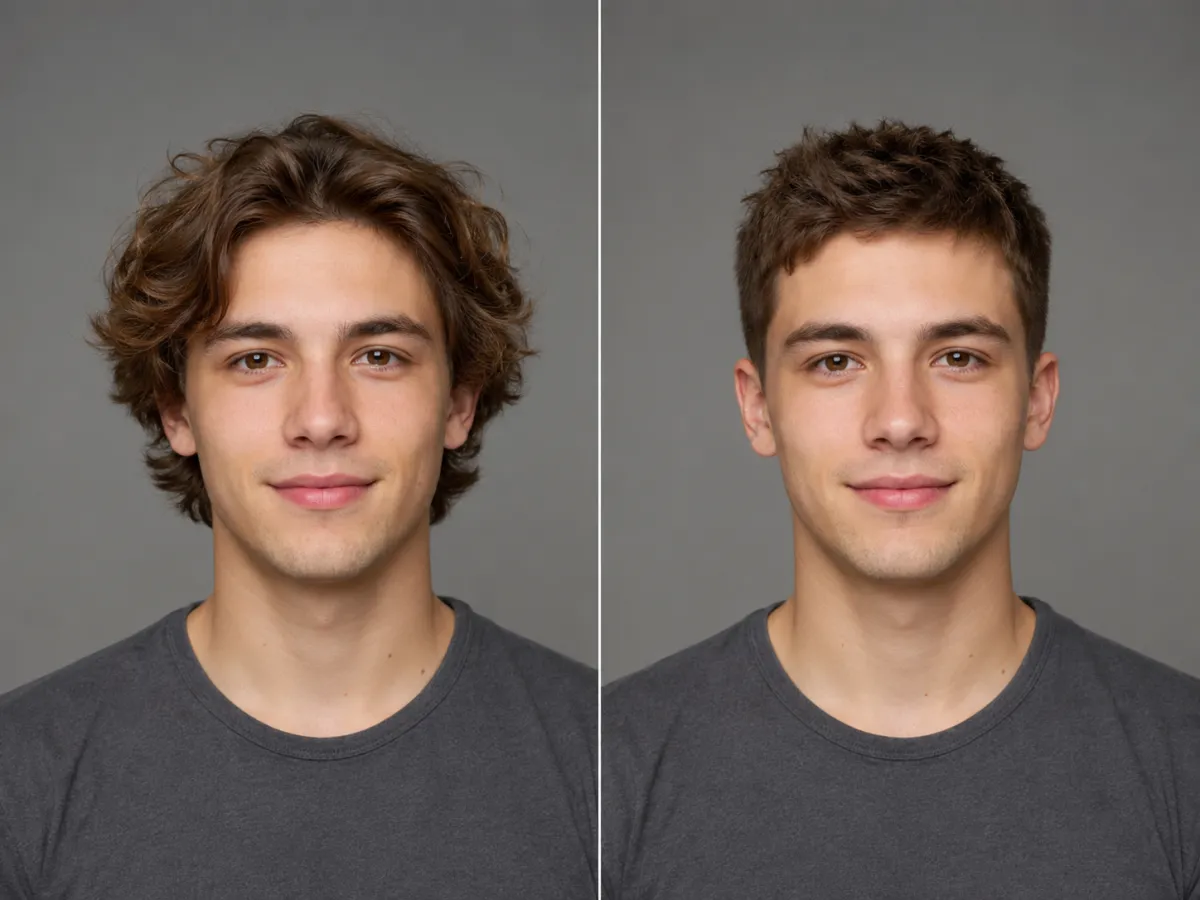
Same selfie, two looks: original hair on the left, a Nano Banana hair edit on the right — the face stays recognizable.
What Nano Banana actually is (verified, 2026)
Before judging it, it helps to know what you're using.
| Question | What we found |
|---|---|
| Who makes it? | Google DeepMind — it's the codename for Gemini's native image generation and editing models. |
| Which model? | The original Nano Banana is Gemini 2.5 Flash Image (August 2025); Nano Banana Pro is the newer Gemini 3 Pro Image. |
| Can it change hair? | Yes — Google explicitly markets it for trying "any hairstyle instantly" while keeping people looking like themselves. |
| Is it free? | Partly. Free users get a limited daily quota at lower resolution, then it reverts to the original model. Higher quotas and 2K/4K come with Google AI Pro ( |
| Key limits | Identity drift after several edits, a visible Gemini watermark on free/Pro tiers, plus an invisible SynthID watermark on every output. |
It is a serious, capable model — not a toy. The friction is the workflow, not the rendering.
Nano Banana vs. a dedicated AI hairstyle changer
Both can put a new haircut on your face. They feel very different to use.
| Nano Banana (Gemini) | Dedicated AI hairstyle changer | |
|---|---|---|
| Edits your own face | ✅ Yes, with good likeness | ✅ Yes, built for it |
| How you pick a style | Type a prompt each time | Tap a style from a hairstyle grid |
| Consistency across tries | ⚠️ Can drift after several edits | ✅ Same face every preview |
| Watermark on output | ⚠️ Visible + invisible (free/Pro) | Usually clean previews |
| Cost for full quality | Free quota, then paid plan | Free to preview in-browser |
| Best for | One-off creative edits, text-in-image | Comparing many haircuts fast |
The short version: Nano Banana is a powerful general editor that can do hair. A hairstyle tool is a single-purpose previewer that does only hair, every time, with no prompt-wrangling. If you want to line up a buzz cut, a bob, and a fringe side by side in two minutes, the dedicated path is simply less work.
Where Nano Banana falls short for haircuts
Three honest gaps showed up in our testing:
- Prompting is the skill. Get the wording wrong and it changes your face, not just your hair. A tool with a Buzz Cut Filter or Bald Filter removes that guesswork — you tap the look instead of describing it.
- No curated style library. You have to know the haircut's name. A hairstyle grid lets you browse and discover cuts you wouldn't think to type.
- Watermarks and quotas. Free outputs carry a visible mark, and the best resolution sits behind a subscription. For a quick "would this suit me?" check, that's overhead you may not want.
None of this means Nano Banana is bad — it's one of the best image models out there. It's just optimized for open-ended creation, not for rapidly auditioning haircuts on your own face.
Frequently asked questions
Can Nano Banana change my hairstyle in a photo?
Yes. Nano Banana is Google's Gemini image model, and it can edit the hair in a photo you upload while keeping your face recognizable. The trick is prompting it to change only the hair and to keep the face identical, otherwise it can drift toward a different-looking person.
Is Nano Banana free to use for hair edits?
Partly. Free users get a limited daily quota at lower resolution in the Gemini app, after which it falls back to the original model. Full-quality and higher-volume use needs a paid plan such as Google AI Pro (around $19.99/month) or Ultra (around $249.99/month).
Does Nano Banana keep my face looking like me?
Mostly, on the first edits. Google built it to preserve likeness, and our early tries held up well. But after roughly four back-and-forth edits we saw faces soften and shift, so it's best to re-upload the original photo and redo the hair change in a single step.
Does Nano Banana put a watermark on the image?
Yes. Images from the free and Pro tiers carry a visible Gemini watermark, and every output includes an invisible SynthID watermark that marks it as AI-generated. That's worth knowing if you plan to share or repost the result.
Is Nano Banana or a dedicated hairstyle tool better for trying haircuts?
For one-off creative edits, Nano Banana is excellent. For quickly comparing many haircuts on your own face, a dedicated AI hairstyle changer is faster: you tap a style instead of writing a prompt, the face stays consistent every time, and previews are usually clean. Many people use both.
How do I get the most realistic hair result?
Start with a clear, front-facing selfie in even light with hair off your face. Then change just one thing at a time — length, then texture, then color — and keep the original photo handy so you can reset if the face drifts. Garbage in, garbage out applies to any AI image model, Nano Banana included.
Related guides
Keep exploring before you commit to a change:
- Try the free AI hairstyle changer → — upload a selfie and preview any haircut on the home page.
- AI Hairstyle Changer: how it works
- Hairstyle try-on: see any haircut on your face
- Buzz Cut Filter and Bald Filter — tap a look, skip the prompt
- See plans and pricing
Ready to see your new look?
Skip the prompt-wrangling. Upload a selfie and try on any hairstyle free → — compare your favorites in minutes, then take the best one to your stylist.