
Hair Mood Board: What to Include and Show Your Stylist
Make a hair mood board with labeled cut, color and texture photos. See an AI reference and hairstyle preview, plus what to ask your stylist.
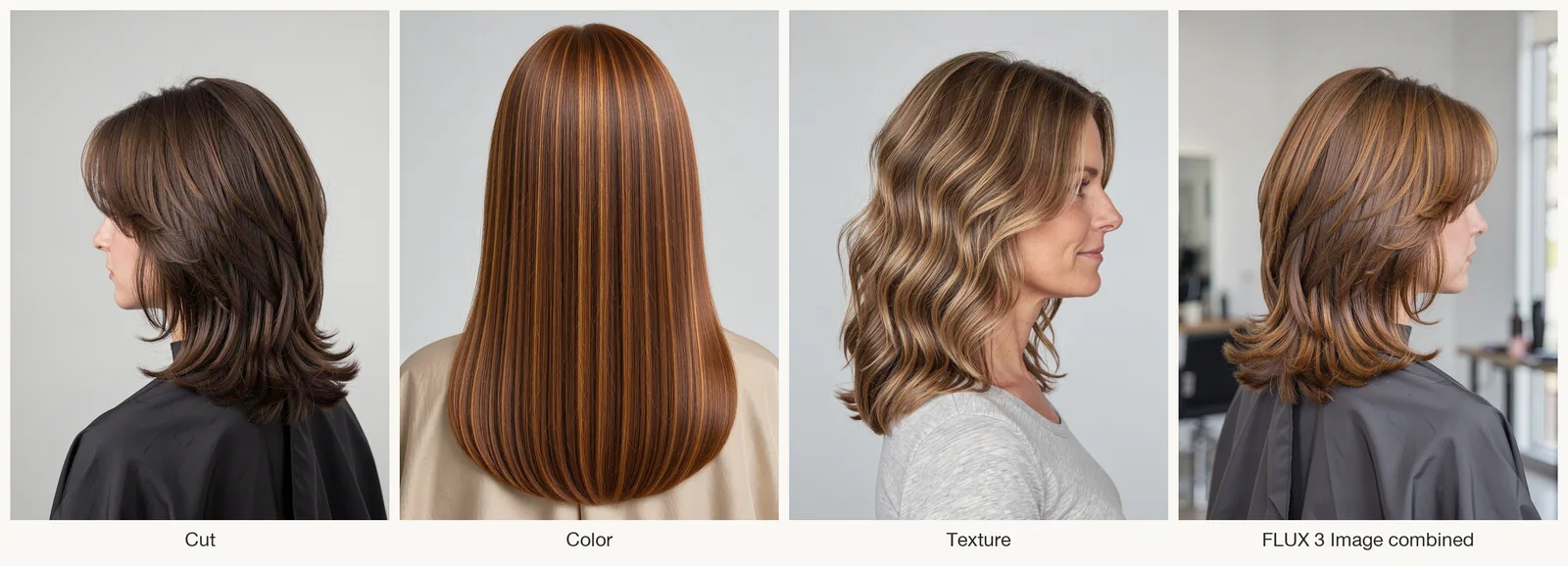
Make a hair mood board with five labeled photos: the cut, color and texture you want, your hair now, and a look you want to avoid. Note exactly what you like or dislike in each. Arrange them on one screen for your stylist, and optionally add a preview from an AI hairstyle changer to help explain the shape and shade.
Last updated: October 2, 2026 · about 6 min read
A camera roll full of hair inspo can leave your stylist guessing: do you want the bangs in one photo, the length in another or the color in both? A labeled mood board makes those choices clear. Here's how to build one, combine separate ideas into an AI reference if needed, and turn them into a hairstyle preview. The example images use AI-generated subjects.
What to put on a hair mood board
Start with five or six images. If two photos make the same point, keep the clearer one.
| Board slot | What it tells your stylist | Tip |
|---|---|---|
| Cut | Length, layers, bangs, overall shape | Choose a photo where the hair is dry and styled the way you'd wear it |
| Color | Tone, depth, highlights or balayage | Choose a well-lit photo without an obvious color filter |
| Texture | Straight, waves, curls, how much volume | Pick hair with a similar density to yours |
| Your hair now | Current length and texture | Take it in daylight with your hair down; add a note about past dye or bleach |
| A "not this" | The line you don't want to cross | Too short, too orange or too blunt is useful to show |
| Styling (optional) | How you'll wear it day to day | Say whether you usually air-dry or blow-dry |
Write a few words under each image: "this length," "this copper shade," "these loose waves." Circle the detail if it's easy to miss. A color reference doesn't have to show your ideal cut, as long as the label makes that clear.
How to make a hair mood board in four steps
- Save ideas, then narrow them down. Gather hair inspiration from Pinterest, Instagram or salon pages. Keep the photos that show a specific detail you want; skip near-duplicates.
- Sort by job. Put each photo into one slot from the table above. Label the part you want your stylist to focus on.
- Add your own photo and a look to avoid. Note your current length and what you dislike about the unwanted look. "Too short at the sides" gives your stylist more to work with than "I don't like it."
- Put it on one screen. Use a phone collage app, a saved board or a single slide. Keep labels readable without zooming, and save a copy you can open at the appointment.
When no single photo shows the whole look
The board at the top of this guide uses three AI-generated references: a layered shag cut, copper color and loose waves. Each shows one part of the intended look. We wanted to combine those details into a single reference.
FLUX 3 Image, a Black Forest Labs model, accepts up to ten reference images with instructions about what each should contribute. You can run it in the browser with flux-3image, an independent web app that isn't affiliated with Black Forest Labs. The key is to give each reference exactly one job:
Prompt: Create one hairstyle reference photo. Image 1 supplies only the haircut: a shoulder-length shag with soft curtain bangs and choppy layers. Image 2 supplies only the hair color: copper auburn with subtle golden highlights. Image 3 supplies only the texture: loose, airy S-shaped waves that run from the mid-lengths to the ends. The final hair must show all three at once: the shag cut and curtain bangs, the copper color, and clearly visible loose waves. Adult woman seen from a three-quarter back angle, face mostly turned away, plain light gray background, soft daylight, salon portfolio photo.
Settings: FLUX 3 Image edit, 3 references, 1K, 3:4.
The combined image keeps the layered, shoulder-length shape and adds copper highlights, though it looks browner than the color reference. It shows flipped ends rather than the texture reference's distinct waves. Keep the original color and texture photos beside it so your stylist can see which details the AI missed.
Preview the look on your own face
A combined reference can help explain the look, but you may also want to see it on your own face. AIChangeHair accepts one portrait and a written description or a preset; you can't upload your own hairstyle reference. We summarized the board in one sentence and applied it to an AI-generated portrait with long, straight dark brown hair.
Custom prompt: Shoulder-length copper auburn shag with soft curtain bangs, choppy layers and loose waves from the mid-lengths to the ends.
Settings: AIChangeHair, one portrait + custom prompt, 1K, 3:4.
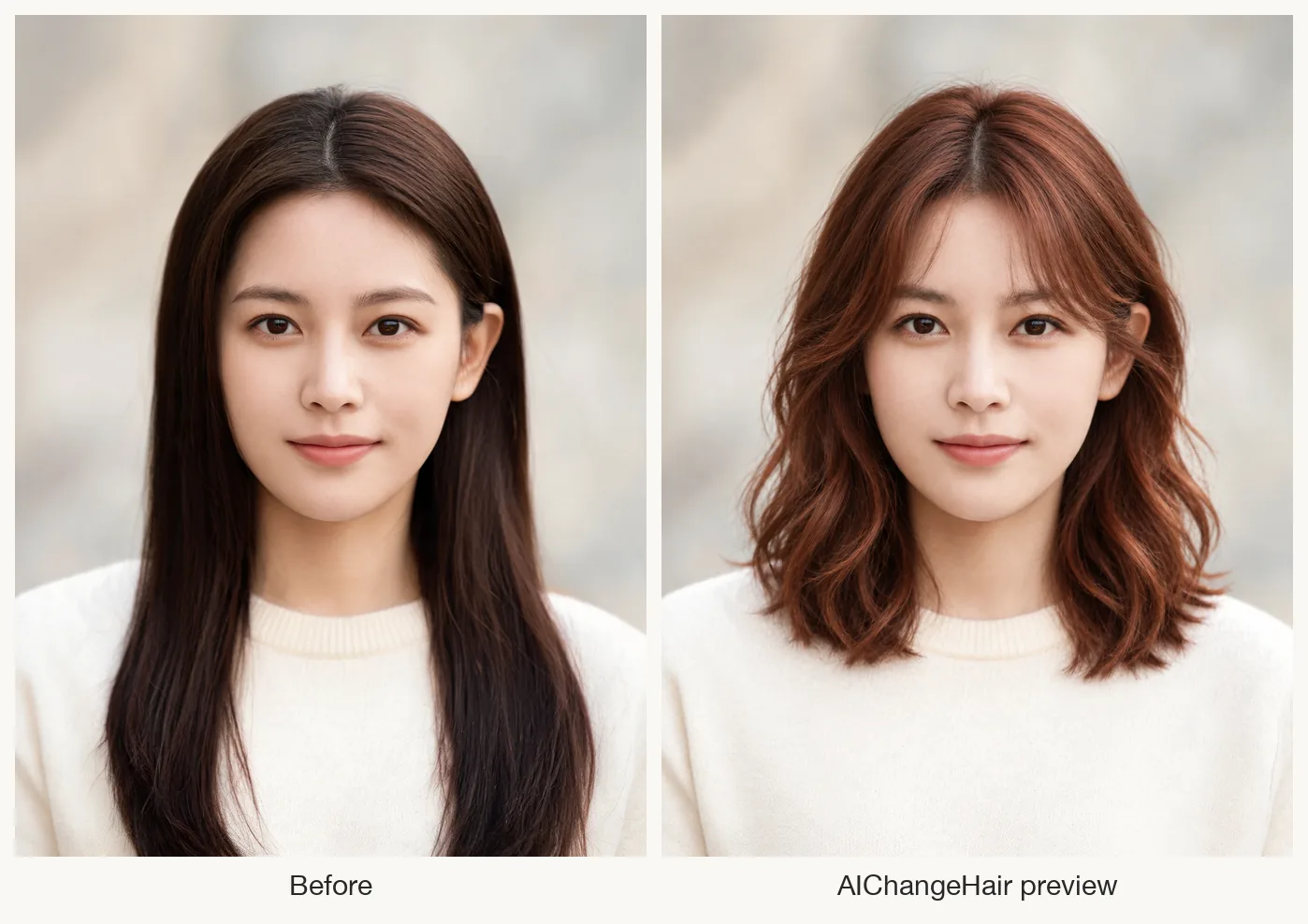
Left: the AI-generated input portrait. Right: the AIChangeHair preview made from the board's one-sentence description. The sweater and background look similar in both.
The preview shows a shorter, layered style with visible waves and a redder auburn shade than the color reference. Her face, sweater and background stay the same. The bangs are wispy, with longer pieces at the sides. Add the preview beside your current photo and label any details you'd change, such as "less red" or "fuller curtain bangs."
You can also test one variable at a time. Try the color alone with the copper hair color changer, or the fringe alone with the curtain bangs filter, before you commit to the full change.
What to say when you show the board
Show the board at the start of the appointment and walk through it slot by slot. Mention which details matter most and where you're open to your stylist's advice:
- "This is the cut I want, but at this length." Point at the cut photo and your own photo.
- "This color, but I don't want it to go red." The "not this" photo helps here.
- "I usually air-dry." Ask whether the cut will still work without a blow-dry.
- "Is this realistic from my starting point?" Tell your stylist about past dye or bleach and ask what the proposed change would involve.
For a longer list of questions to ask, see our AI hair preview checklist for your stylist.
Frequently asked questions
What should a hair mood board include?
A photo for the cut, one for the color, one for the texture, a current photo of your own hair and one look you don't want. Label each with what you like about it.
How many pictures should I bring to my hairdresser?
Five or six is a useful starting point for this board. Choose one clear photo for each detail instead of several nearly identical looks. Keep extra ideas separate so they don't obscure your main choices.
Can I make one reference photo from several hair inspo pictures?
Yes. Some AI image models accept several references with instructions to use the cut from one, the color from another and the texture from a third. Our combined image showed layers and copper highlights, but missed the distinct waves and looked browner than the color reference. Keep the original photos too.
Can I see a hairstyle on my own face before the appointment?
Yes. Upload a clear front-facing photo to an AI hairstyle changer, then pick a preset or describe the cut, color and texture from your board in one sentence. Use the preview to discuss the look with your stylist, who can assess whether it suits your hair's density, texture and color history.
Related guides
- Try the free AI hairstyle changer →
- Preview copper hair on your photo
- Try curtain bangs before you cut
- Test any shade with the AI hair color changer
- AI hair preview checklist to bring to your stylist
Bring your hair mood board to the appointment
Label your cut, color and texture references, then add a preview if it helps explain the look you want. Preview your next hairstyle →