
AI App to Suggest a Hairstyle: Test One Recommendation
Use an AI app to suggest a hairstyle as a starting point, then test one recommendation with controlled variants before a haircut.

An AI app that suggests a hairstyle is most useful when you treat its first recommendation as a hypothesis, not a verdict. Use one clear source photo, test the suggested look against two controlled variants, and write down the one or two details you would keep. A hairstyle try-on can turn that vague recommendation into a smaller, more practical decision before you book a haircut.
Last updated: October 1, 2026 · about 8 min read
The suggestion may be a short crop, soft layers, a bob, a fringe, or a change in part. It can be useful precisely because it gives you something concrete to react to. The next step is not to generate twenty unrelated looks. It is to find out whether you like the recommendation's length, face framing, texture, or overall silhouette when the rest of the photo stays stable.
Start with one recommendation, not a makeover
Recommendation tools and preview tools answer different questions. A recommendation gives you a possible direction. A preview helps you inspect that direction on the same face and photo. Neither one can promise how a cut will behave after washing, in humidity, or with your own styling routine.
| What you want to know | Best first move | Keep stable | Useful output |
|---|---|---|---|
| What direction should I explore? | Get one AI suggestion | Your current photo and broad hair color | A haircut family to react to |
| Do I like the suggested shape? | Preview it on the same portrait | Face, lighting, expression, and background | A yes/no response to length or fringe |
| Which version feels practical? | Compare two variants | The suggested style family | A note about maintenance and comfort |
| Can I make the salon appointment? | Discuss your short list with a stylist | Your current hair and history | A realistic adaptation |
The goal is a better question, such as: “Do I like the softer layers around my jaw?” or “Would I rather keep this length with less fringe?” That is far more actionable than asking an app to pick a permanent answer for you.
A polished preview can make you react to new lighting, makeup, or an altered expression instead of the haircut. If the face and photo have changed noticeably, do not use that image as a decision-maker.
The three-preview test
Use the first suggestion as the middle of a small comparison. Make only three previews on the same original photo.
- Keep the suggested look. This is your reference. Look for the one element that catches your attention: the length, the part, the fringe, the shape around the cheeks, or the texture.
- Make a lower-commitment variant. Keep the same family, but make the change easier to live with. For a short bob, that might mean a collarbone-length lob. For a heavy fringe, it might mean a lighter curtain fringe.
- Make one clear contrast. Keep the photo and broad direction, but move one feature in the other direction: a little shorter, a little longer, more or less volume, or a different part.
For example, a suggestion for a textured crop does not require you to compare it with a bright-red long ponytail. Compare the crop with a slightly longer textured cut and a cleaner, shorter version. The result tells you whether the appeal is the texture, the reduced length, or the open forehead.
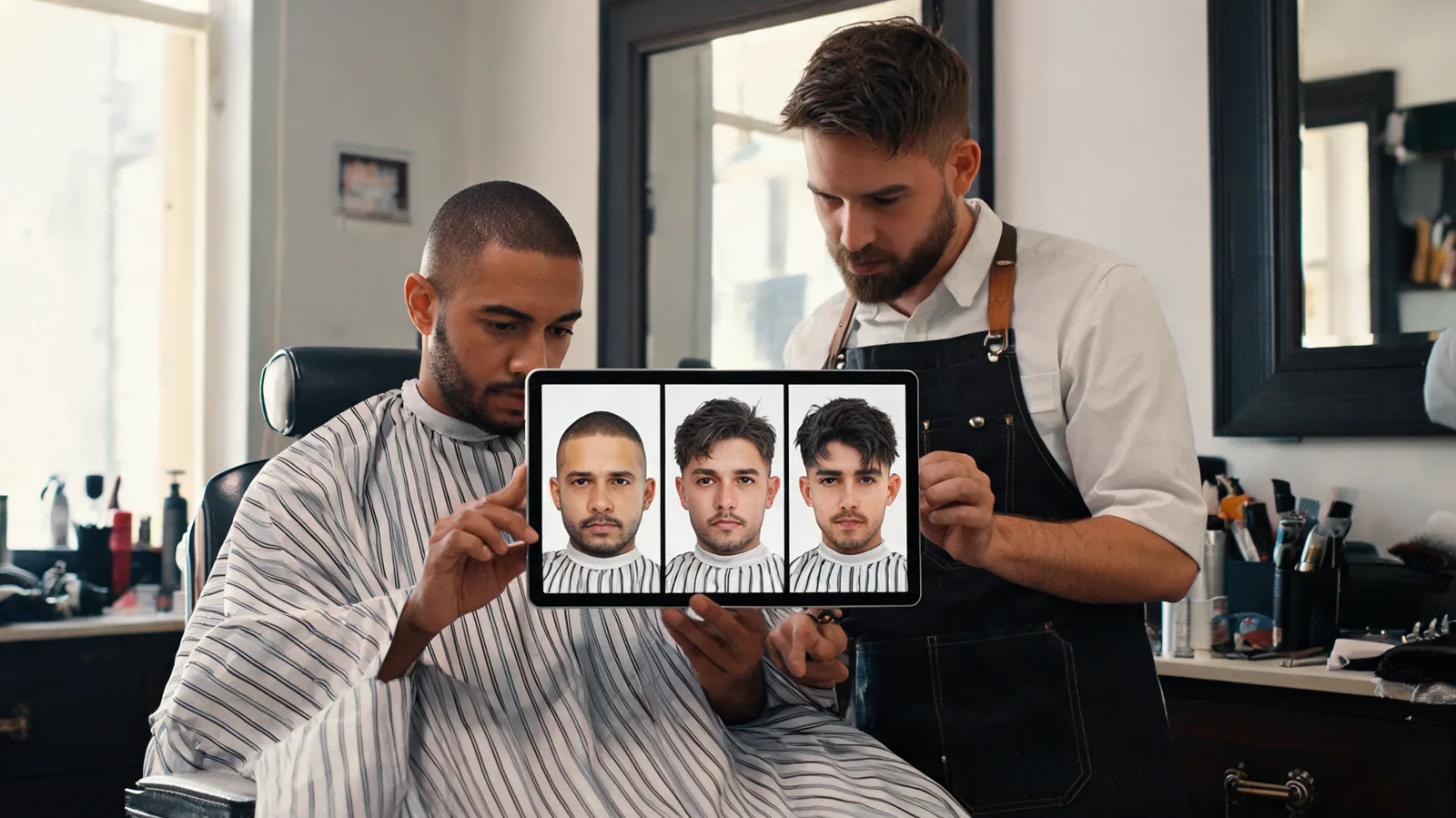
Three related previews reveal more than a gallery of unrelated transformations.
What to inspect in each preview
Before choosing a favorite, view the images at normal phone size as well as zoomed in. Zooming helps you notice a broken hairline or hair that merges into clothing. Normal size helps you notice the broad shape you will see in everyday life.
| Feature to inspect | Question to ask | A useful next adjustment |
|---|---|---|
| Face framing | Does the hair open my face or crowd my cheeks and jaw? | Add or remove soft layers near the face |
| Length | Would I be comfortable with this line after a few weeks? | Move the endpoint slightly above or below the jaw or shoulder |
| Fringe and part | Do my eyes and forehead feel visible enough? | Test a lighter fringe or a different part |
| Volume | Do I like the silhouette, or only the blowout? | Ask for less lift or a more natural texture |
| Maintenance | Could this work on an ordinary morning? | Keep the shape but choose a simpler finish |
Make one sentence for the version you prefer. “I like the shorter shape, but not the full fringe” is specific enough to guide a barber or stylist. “This is the one” is not; it leaves the useful detail hidden inside the image.
Hold the source photo constant
The most important control is your original portrait. Use a recent, unfiltered photo with your face and current hairline visible. Even lighting and a plain or uncluttered background make the change easier to read. Do not switch photos for each style.
If you use the AI hairstyle changer, change one major hair feature at a time. Keep the face, expression, clothes, light, and background unchanged. A restrained request might be: “Keep my face, expression, lighting, and background the same. Change only my hair to a collarbone-length layered cut with a soft side part.” You can then change only the part or only the length in the next version.
This is also why it helps to separate cut and color. First use the same color to decide whether the silhouette works. If you then want to explore shade, use the AI hair color changer with the haircut fixed. You will know whether your reaction comes from the haircut or the color direction.
Turn a recommendation into a salon conversation
An AI result cannot inspect your density, curl pattern, cowlicks, chemical history, or how much styling you are willing to do. A good salon conversation brings those missing facts back into the decision.
If a preview depends on daily heat styling, treat that as a maintenance question rather than a promise. The American Academy of Dermatology notes that excessive heat can damage hair; its hair-styling guidance is a useful reminder to discuss a lower-effort finish if that matters to you.
Bring these three items:
- Your original photo, so the stylist can see your current length and natural texture.
- One or two chosen previews, rather than every version you generated.
- A short note, naming what you like and what you do not want.
Try phrases such as “I like the movement around my jaw, but I need to tie it back,” or “I like the side part, but I do not want to use hot tools every day.” If a suggestion would require more length, a different texture, or more upkeep than you have, your stylist can offer a version that keeps the part you liked.
When the suggestion is not useful
Sometimes a recommendation is too generic, too dramatic, or simply not your taste. That is still useful feedback. Do not keep generating until an image flatters you for reasons unrelated to the hair. Instead, identify the mismatch.
| If this happens | Try this instead |
|---|---|
| The face looks different in every result | Use a clearer source photo and reject any preview that changes the person |
| The suggested cut feels too bold | Keep the same shape but choose a longer, softer variant |
| You like the color but not the cut | Fix the cut, then test color separately |
| You cannot name what you like | Compare only two related versions and focus on one area, such as the fringe |
| The result looks hard to maintain | Ask what part depends on styling, then choose a lower-effort adaptation |
If you are still deciding whether your question is about color, haircut shape, or shaving, start with the hair color changer, hairstyle changer, and bald filter guide. That choice comes before recommendation testing; it keeps a color decision from being mistaken for a haircut decision.
A recommendation is a starting point, not a rule
The best outcome from an AI hairstyle app is not a perfect virtual haircut. It is a clear preference you can explain: a length you want to keep, a fringe you want to avoid, or a softer shape you want to ask about. Use the suggestion to create a controlled three-preview test, keep your original photo in view, and let a stylist adapt the direction to real hair.
Frequently asked questions
Can an AI app tell me exactly which hairstyle I should get?
No. An AI suggestion is a visual starting point, not a guarantee about your hair texture, density, growth pattern, salon technique, or daily routine. Use it to identify details you like, then discuss what is practical with a stylist.
How many AI hairstyle previews should I make?
Start with three: the suggested look, one softer or longer variation, and one bolder or shorter variation. Keep the same source photo and change one feature at a time so the comparison stays useful.
Should I change hair color and cut in the same AI preview?
Not for your first comparison. Hold color steady while you assess a haircut, then hold the haircut steady while you assess color. Changing both at once makes it difficult to tell which change you prefer.
What should I show a barber or stylist after using an AI hairstyle app?
Bring the original photo and one or two chosen previews. Briefly name what you like about the length, fringe, shape, or color, and what you want to avoid. Ask how that direction would translate to your own hair and maintenance routine.
Related guides
- Try the free AI hairstyle changer →
- Try a bangs filter on your photo
- Compare a buzz cut preview before going short
- Choose the right kind of hair preview
Test the detail you care about
An AI suggestion becomes useful when it helps you name one decision. Start a hairstyle try-on, keep the source photo stable, and compare the recommendation with two related variants before you decide what to discuss at the salon.