
curtain bangs wig: Preview the Fringe Before You Choose
Preview curtain bangs fringe placement on your portrait to shortlist a look, then check real wig photos, specs, and seller details before you buy.
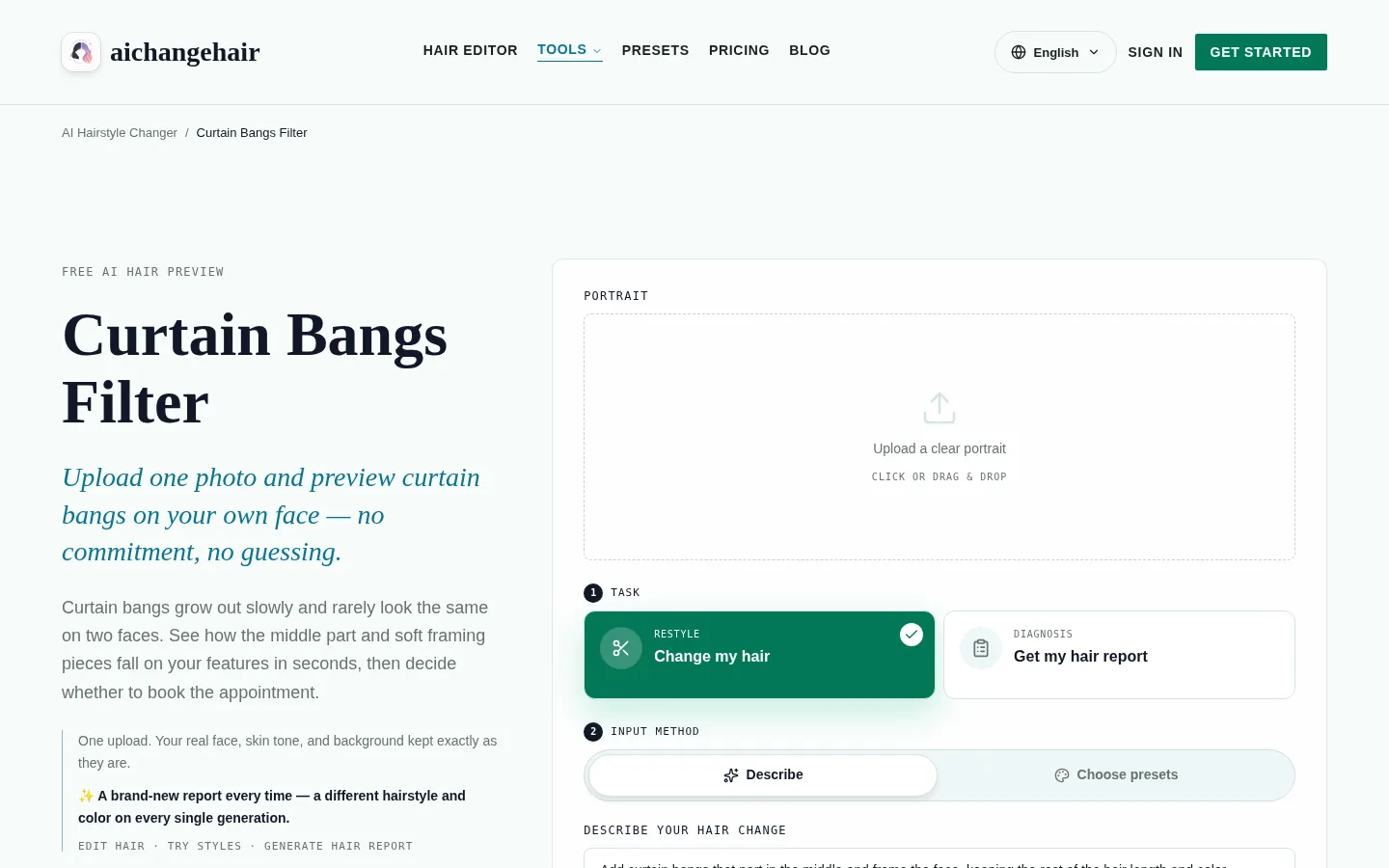
To preview curtain bangs before choosing a wig, use the curtain bangs filter on a clear portrait to compare the center part and face-framing length. Then check the wig’s own product photos and listing specifications for cap construction, fit, density, fiber, and return terms; a portrait preview cannot show those physical details. Keep it as a style shortlist, not proof that a particular wig will fit or look the same.
What makes the curtain-bang shape distinctive?
A curtain fringe has a center opening and pieces that sweep outward, so compare the part, the shortest point, and the movement. On a wig, those visual qualities depend on things a portrait edit cannot show: where the part is placed on the cap, how much hair density sits at the front, whether the hairline is designed to be exposed, and how the fiber behaves when it is styled away from the face.
Use the portrait preview to narrow the shape you want, then judge each candidate by its own product photos, listed measurements, and seller guidance. Confirm unclear details with the seller before buying.
Step-by-step: from portrait preview to a shortlist you can inspect
- Start with a clear, front-facing portrait. The curtain bangs page asks for one clear photo with your forehead and hairline visible. This is what lets the preview place a fringe around your face instead of guessing.
- Choose the curtain-bang task and adjust the description. The page opens on the curtain-bang edit and prefills a description for middle-parted, face-framing curtain bangs. You can edit that wording to describe a softer or longer sweep before you run the edit.
- Review where the fringe lands. Look at the center split, the shortest point of the fringe, and the direction of the sweep on your portrait. This shows visual placement only; it cannot tell you how a wig will fit or feel.
- Run one or two alternatives. If the first result feels too heavy or too short, adjust the description and compare. Keep the versions that put the fringe where you want it.
- Turn the preview into a shopping brief. Write down the part position, fringe length, and sweep you liked, plus the overall length and color you want to keep. This becomes what you compare against real wig listings.
- Inspect product photos and specs on each listing. Check the wig's own front and part photos, advertised density, front length, cap measurements, and fiber and heat guidance. Ask the seller when a measurement is not listed.
- Confirm fit and return terms before buying. Fit, construction, and return conditions are seller-specific. Read them on the listing; the preview does not answer those seller-specific questions.
Which curtain-bang shape should you shortlist?
Start with the part, shortest point, and sweep that you liked on your portrait, then compare those details with the actual wig listing. Curtain bangs are a family of shapes, not one fixed cut. Compare the visible shape with the listing details; the label alone may not tell you how the fringe is cut. Wig retailers often group curtain-bang styles by overall length, texture, or cap type, and those groupings can help you narrow a catalog quickly.
Compare at least these features across candidates:
- Where the part sits. Center-parted styles are common, but a listing should show the actual part on the wig.
- How long the fringe is at its shortest point. A fringe that ends high on the forehead reads very differently from one that falls near the cheekbone.
- How far the sweep extends. Some curtain bangs blend into face-framing layers; others stay closer to the eyebrow line.
- Texture and movement. Wavy or textured curtain bangs behave differently from smooth ones, and wig fiber affects how the fringe holds a shape.
- Overall length and layering. The rest of the wig's cut changes how the fringe reads, so compare the full style, not just the front.
Milano Wigs’ curtain-bang styling guide discusses different lengths and styling steps. MyFirstWig’s curtain-bangs catalog filters products by hairstyle, color, length, and cap category. Retailer labels can help narrow a catalog, but the individual product listing is where to verify details. Check the wig’s fiber and styling instructions before applying heat or making changes. Do not cut a new wig based on a portrait preview; ask the seller or a wig professional first.
What can a portrait preview tell you about fringe placement?
It can help you compare where a fringe opens and how its face-framing pieces sit in a portrait. The portrait preview is about your face and the shape of the fringe, not about a product. It can help you compare the visual result of a middle part versus a slightly off-center one, a shorter sweep versus a longer one, and a style that frames the face tightly versus one that blends into longer layers.
The live page shows a clear-portrait upload, a Change my hair task, and both describe and preset options. The description is prefilled for middle-parted, face-framing curtain bangs, and you can edit it. Treat the result as a visual idea; a finished wig’s appearance and behavior depend on its construction and fiber.
The live page opens with a portrait upload and lets you choose a description or preset.
A useful field to keep at the front of that comparison:
- center split
- shortest face-framing point
- sweep direction
- overall visual balance with the rest of the hair
These are all things a portrait can help you picture. None of them tell you how a wig cap will sit on your head.
Example previews and how to read them
To see what a portrait preview can show, look at two hairstyle-preview examples made with AIChangeHair. Both are visual previews from described requests, and neither is a wig fitting.

Here the request was: “Add curtain bangs that part in the middle and frame the face, keeping the rest of the hair length and color.” The result is an AIChangeHair hairstyle preview from that request. It shows how a soft center-parted fringe sits with long dark brown hair, but it cannot show a wig's front hairline, density, or cap.

This second preview used the request: “A shoulder-length layered shag with soft curtain bangs that part in the middle; keep the hair color.” It is a separate style preview. Comparing the two gives you a sense of how fringe length and the surrounding cut change the overall look, which is exactly the kind of decision a preview can support before you shop.
Neither image is a personal real-user test, and neither validates a wig's construction. They are illustrations of the shortlisting step.
Which decisions belong to the preview and which belong to the listing?
Use the portrait for appearance questions and the listing for physical product details. The table below separates the two kinds of questions. Keep it open while you browse listings.
| Question | Can the portrait preview help? | Must be checked on the actual wig |
|---|---|---|
| Where should the fringe split? | Yes, compare center and near-center placement on your portrait. | The product's own front photos show where the part is placed on the wig. |
| How short is the face-framing point? | Yes, compare shorter and longer sweeps visually. | Advertised fringe and front length, plus how the fiber holds a shape. |
| How does the sweep read? | Yes, as a visual balance with your face. | Styling guidance for the wig's texture and fiber. |
| Overall balance with the rest of the hair | Yes, as a style preview. | Overall length, layering, and density as listed for the item. |
| Is the front hairline designed to be exposed? | No. | The wig's frontal or part photos and construction details. |
| How much hair density sits at the front? | No. | Advertised density and close-up product photos. |
| Will the cap fit your head? | No. | Cap measurements and fit guidance from the seller. |
| How does the fiber feel or react to heat? | No. | Fiber type and heat guidance on the listing. |
What should you check in wig photos to judge the part and density?
Use the product’s own straight-on and close-up photos, then confirm specifications on that listing. The product page's own photos are your best evidence of what the wig looks like. Start with front-facing views taken straight on, then look for close-ups of the part and hairline. A listing that only shows styled, side-angled shots makes it harder to judge how the fringe will actually sit.
When you review photos, ask:
- Does the part look clearly defined, and is it placed where the listing says?
- Is the front density light enough that the hairline is visible, or does it look heavy at the forehead?
- Do the fringe and face-framing layers look proportionate for the listed length?
- Does the hairline construction match the style you want to wear day to day?
- Are there photos taken at different angles, including a straight-on front view?
Retailer catalogs such as MyFirstWig's curtain-bangs collection group styles by cut and cap category, which can help you compare offerings, but the individual product page is what tells you about that wig's part and density. Treat manufacturer specifications as authoritative for the specific item, and ask the seller to confirm any dimension or term that is unclear before you order.
What does a portrait preview cost to try?
AIChangeHair has a free Starter option, but generating an edit requires sign-in and credits. The live curtain-bangs page lists 10 signup credits plus 10 credits for each day you claim them; a 1K edit costs 10 credits, 2K costs 16, and 4K costs 24. Paid plans and credit packs are also listed, so check your available balance before planning several previews.
A hairstyle preview cannot assess physical wig fit or construction.
A portrait preview belongs to the shortlisting stage. The budget for the wig itself depends on the seller's listing, fiber, cap, and construction, and that price should be confirmed on the product page.
A short FAQ for curtain-bang wig shoppers
Can a portrait preview show me how a wig will fit?
No. It shows fringe placement on your portrait. It cannot assess physical wig fit or construction, including cap size, hairline design, or density.
What should I compare first when browsing curtain-bang wigs?
Start with the part position, the shortest point of the fringe, and how far the sweep extends. Then compare overall length and texture, and confirm each detail on the product's own photos and specs.
Do all curtain-bang wigs have a center part?
Center-parted curtain bangs are common, but listings vary. Check the product’s part photos and confirm with the seller if the part is unclear.
Can I trim a new wig to match the preview?
Do not cut a new wig based on a portrait preview. Ask the seller or a wig professional first, and follow the item's own styling guidance for its fiber and construction.
Are wavy or curly wigs suitable for curtain bangs?
Texture changes how a fringe behaves, and styling can vary by wig type. Check the product's fiber, texture, and styling instructions, and confirm suitability with the seller for a specific item.
Next step
Preview the fringe first, then shop the wig. Open the curtain bangs filter, upload a clear front-facing portrait, and compare a center-parted sweep with one or two edited variations. For a broader view of fringe options, try the bangs filter or the AI hairstyle changer. When you have a shortlist, read curtain bangs filter guide and blunt bangs vs curtain bangs to sharpen your shortlist, then judge each candidate wig by its own listing photos, specifications, and seller-confirmed fit and return terms.