
Bald Filter on Instagram: Check Availability First
Looking for a bald filter on Instagram? Check whether an effect still opens, separate older tutorials from current options, and inspect a shaved-head preview.
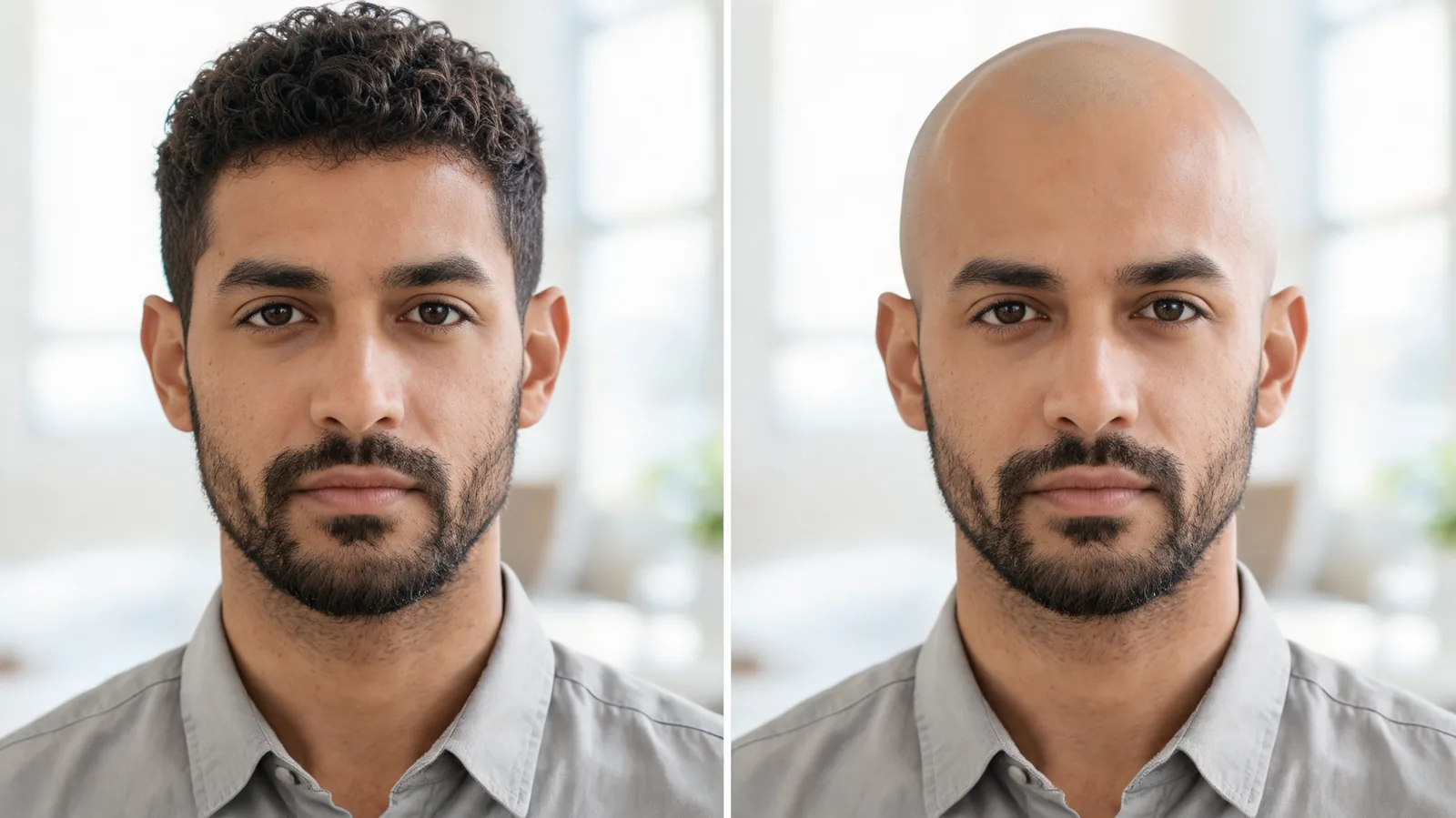
To try a bald filter on Instagram, first check whether the referenced effect actually opens in your account. Old tutorials are unreliable after the removal of third-party Meta Spark effects. If you want a saved shaved-head comparison, use a clear original photo with an AI hairstyle changer and inspect the invented scalp and unchanged facial features.
Last updated: October 4, 2026 · about 7 min read
Why an old Instagram bald-filter tutorial may fail
A tutorial can be accurate for the day it was made and unusable now. Meta ended third-party Meta Spark effects on January 14, 2025. That includes effects made by outside creators and brands, rather than every effect made by Meta itself.
Wes Davis's report for The Verge documents the change and notes that existing videos using those effects could remain. The continued presence of a clip therefore does not establish that its effect is still available.
This matters when a video tells you to visit a creator's profile, find an old effect tab, or follow a particular effect link. Repeating those steps does not bring a retired effect back. A clip labeled “Instagram bald filter” may also show a result created elsewhere and then uploaded.
This guide does not confirm a named bald effect in Instagram. Instead, it gives you a way to determine whether the item you found is usable and whether its result answers your question.
How do you check an effect before trying it?
Start from the actual item you found rather than a remembered menu path. Instagram's controls can change, so do not spend time hunting for a button solely because it appears in an old screenshot.
- Identify the effect, if one is named. Look for an effect attribution or a link supplied with the clip. A hashtag or caption saying “bald filter” is a description, not proof that an interactive effect exists.
- Try opening it inside your current Instagram account. Check whether it leads to an effect you can use, an unavailable notice, a creator profile, or another app. If it never opens as an effect, stop treating the tutorial as a current route.
- Inspect a private preview before recording or sharing. Confirm that it removes scalp hair rather than merely changing color or stretching the face. Check both the look and the destination before granting permissions or following additional links.
Updating the app can help with ordinary interface problems, but it cannot restore a retired third-party effect. If a link is unavailable, you do not need to reinstall repeatedly or enter your login on a separate website to unlock it.
A working effect link establishes availability for your session. It does not establish that the resulting scalp is anatomically accurate.
Is it an AR effect or an edited photo?
These workflows produce different things. A camera effect follows a moving face. A still-photo edit produces one saved image. Either can be used for a playful post, but they have different failure points.
| What you found | What it may let you do | What it cannot establish |
|---|---|---|
| An effect that opens in Instagram | Preview and record in the app | That the scalp shape is your real shape |
| An old Reel with an unavailable effect | Watch the existing clip | That you can reuse the effect today |
| A photo edited outside Instagram | Save an image and upload it | That an interactive Instagram effect was used |
| A bald hairstyle preset on your own photo | Make a stable visual comparison | How a real shave will look from every angle |
If you mainly want a short clip for fun, a live effect may suit the task. If you want to examine the face and head at equal scale, a still image is easier to put beside the original. Choose by the output you need, not by the name in the caption.
Make a controlled shaved-head preview in three steps
The bald filter offers a photo-based alternative when an Instagram effect is unavailable or when you want a still comparison. It uses an uploaded portrait and hair-focused options. It cannot recover scalp details hidden by the hair.
First, choose a photo with the whole head in frame. Use a level camera, even light, and a plain background. Keep the ears visible when possible. A hat, cropped crown, or thick fringe hides the boundaries that matter most for a shaved-head edit.
Second, request the exact degree of removal. A smooth shaved scalp, a close buzz, and a receding hairline are different requests. Begin with one. Keep the beard, eyebrows, expression, clothes, and setting unchanged so you can see what removing scalp hair does to the picture.
Third, compare with the untouched original. Open both images at the same scale. Check whether your eyes, nose, jaw, ears, and beard remain recognizable before judging the scalp. If the editor also changes your facial features, retry from the original.
An example instruction is: “Remove scalp hair for a smooth shaved-head preview. Keep the face, eyebrows, beard, ears, clothing, pose, lighting, and background unchanged.” The instruction is a request, not a guarantee. The saved image still needs inspection.
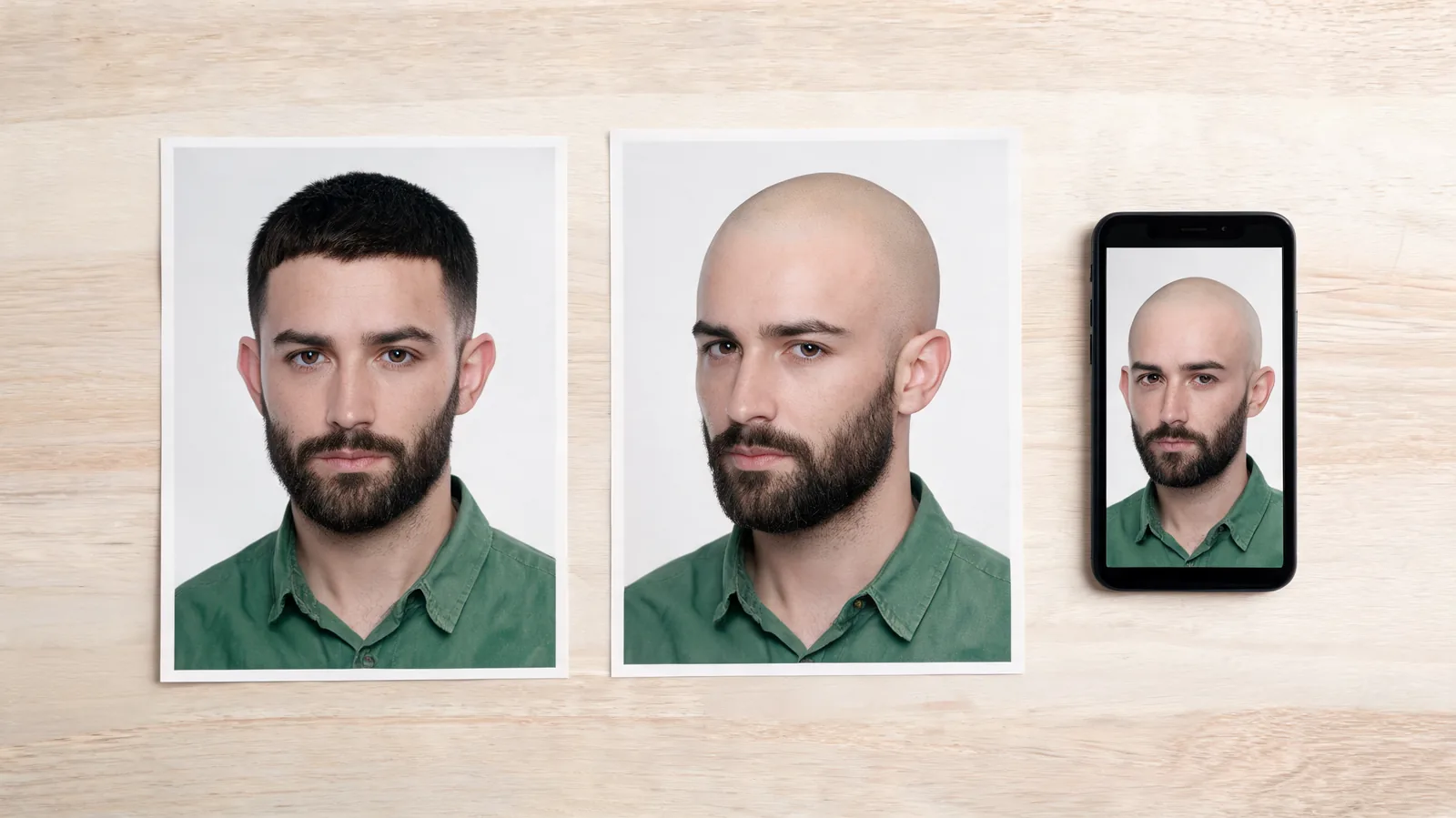
Illustrative portraits, not an Instagram screenshot: a saved comparison lets you inspect the head and face at equal scale.
What should you inspect around the scalp?
Hair conceals shape. Removing it from an image requires the editor to fill in something that was not photographed. A smooth curve can look plausible while still being an invented curve.
Check these areas before keeping the result:
- Crown height: Is the head suddenly much taller or flatter than the visible forehead suggests? Do not assume either version is accurate where hair hid the boundary.
- Temples and ears: Look for an ear shifted outward, duplicated skin, or a patch of old hair that survived the edit.
- Scalp light: The highlight should make sense with the face's lighting. A shiny patch from a different direction can make the preview look pasted on.
- Hair-removal edges: Inspect the neck, sideburns, and the area above each ear for leftover strands or abrupt color transitions.
- Face and beard: A narrower jaw or thicker beard changes the comparison. Keep these details stable unless they are the subject of a separate edit.
Look at the image normally before zooming in. An obvious outline problem at phone size matters more than a tiny texture flaw visible only at extreme magnification. If the overall head shape is unclear, start with a better-framed original instead of polishing a weak result.
A buzz cut filter can provide a separate short-hair reference when a completely smooth scalp hides the length you meant to test. Use the same original photo for that comparison; do not edit the already bald result into another look.
Save the preview without turning it into a different image
Open the downloaded file outside the editor. Confirm that the right version was saved and that the top of the head remains visible. A crop made for a Story or profile picture can remove the very outline you were trying to inspect.
Keep the unfiltered original and the full-size preview. If you add a social filter, strong contrast, or face smoothing afterward, save that as another copy. Those changes may suit a post but make it harder to judge what the hair edit actually did.
When sharing, describe it as a shaved-head preview or edited image. An ordinary uploaded image does not become an interactive Instagram effect, and a saved picture should not be presented as evidence that a particular effect still works.
If your question changes from availability to a broader haircut decision, use the guide to seeing yourself bald. For the separate problem of previewing dye shades, the Instagram hair color filter guide explains what a color comparison can show. A shaved-head availability check does not answer a dye question.
Editorial disclosure: AIChangeHair provides visual hair previews. The images here are illustrations, not demonstrations of an available Instagram effect or a measured product result. A filter cannot show unphotographed scalp details or promise a real shaving outcome. This guide makes no claim that a specific effect is available to every account.
Frequently asked questions
Is there still a bald filter on Instagram?
Do not assume a particular effect is available because an older tutorial shows it. Third-party Meta Spark effects ended on January 14, 2025. Check whether the effect opens in your current account; this guide does not confirm a named bald effect.
Why can I watch a bald-filter Reel but not use the effect?
An existing video can remain visible after the effect used to make it is unavailable. It may also have been edited in another app and uploaded to Instagram. Watching the clip does not prove that its effect can be opened in Instagram today.
Can I post a bald preview made outside Instagram?
You can upload a saved preview as an ordinary image if it meets the platform's requirements and you have permission to use it. That does not create an interactive Instagram effect. Describe the image honestly as an edited preview.
Will a bald filter show my actual head shape?
Only partly. Visible forehead and ear positions provide clues, but hair can hide much of the scalp outline. A filter or image editor must invent the covered area, so its scalp shape, highlights, and shaving shadow are estimates.
Related guides
- Try the AI hairstyle changer →
- Bald filter
- Buzz cut filter
- What would I look like bald?
- Instagram hair color filter
Keep a preview you can inspect
Try the bald filter with one clear original portrait. Save the comparison only when the face stays recognizable, and treat the hidden scalp shape as an estimate.