
What Would I Look Like Bald? See It Free with an AI Bald Filter
A free bald filter previews a clean-shaven look on your own selfie in seconds. Here's how it works, how realistic it is, and who uses it to see the look.
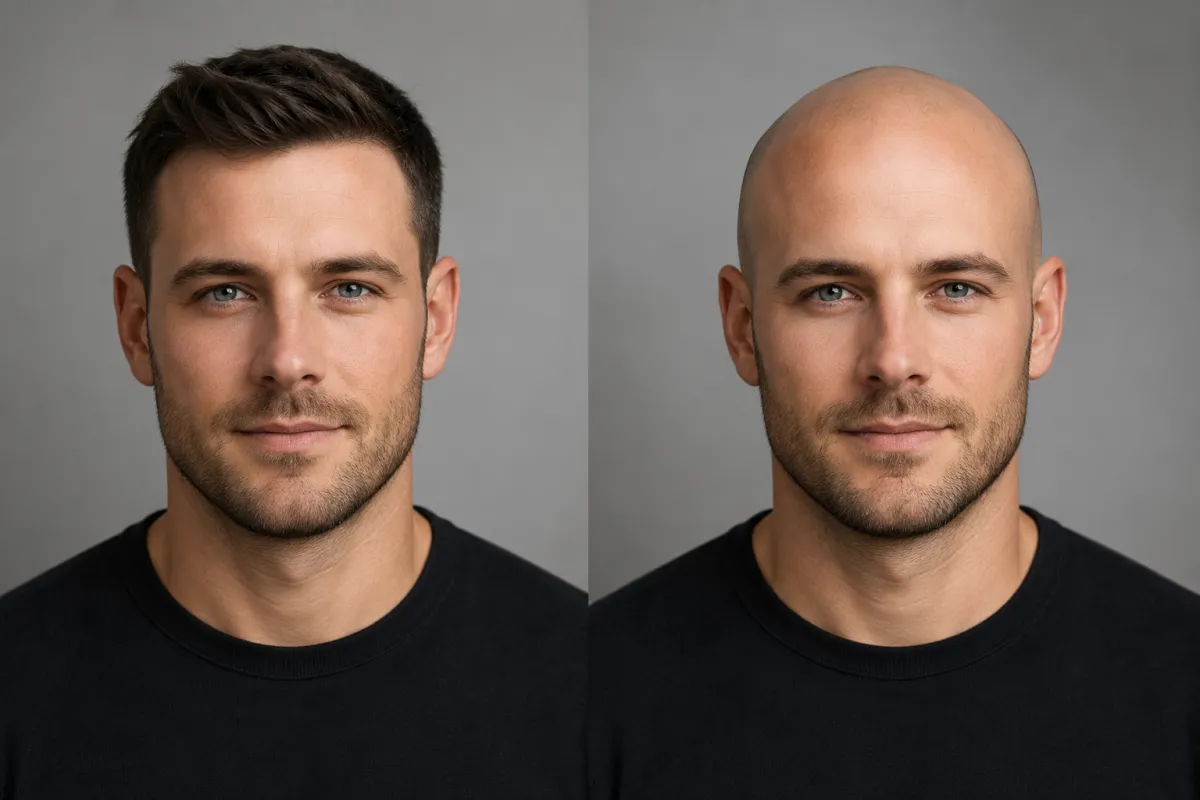
A bald filter lets you upload one selfie and see a clean-shaven, bald look on your own face before you ever pick up a razor. An AI hairstyle changer maps your head shape and hairline, then renders a realistic shaved-head preview in seconds — free, in your browser, with nothing permanent and nothing to regrow if it isn't for you.
It answers a question people type into AI assistants every day: "What would I look like bald?" Instead of imagining it, you simply see the look on your own photo. This guide walks through the 3-step flow, what the preview actually shows, the factors that affect realism, and where a filter beats a razor or a general chatbot.
Last updated: June 17, 2026 · ~6 min read
How to see what you'd look like bald in 3 steps
There's nothing to download and no account to create. From selfie to preview takes under a minute.
- Upload a clear, front-facing selfie. Even lighting, hair off the forehead, no heavy beauty filters. This is the single biggest factor in a believable result, because the tool needs to read your hairline and the outline of your head.
- Choose the bald or clean-shaven look. Pick a fully shaved head, or a near-bald finish with light stubble. Some tools let you type the look you're after, e.g. "smooth clean-shaven head, natural skin tone."
- Preview, compare, and save. The AI returns a bald look on your face, keeping your features and lighting intact. Save it, line a couple of variations up side by side, and you have a neutral reference to look at on your own terms.
Worth knowing: a preview is the lowest-stakes way to see the look first. Nothing is shaved, nothing changes, and you can close the tab if it isn't for you.
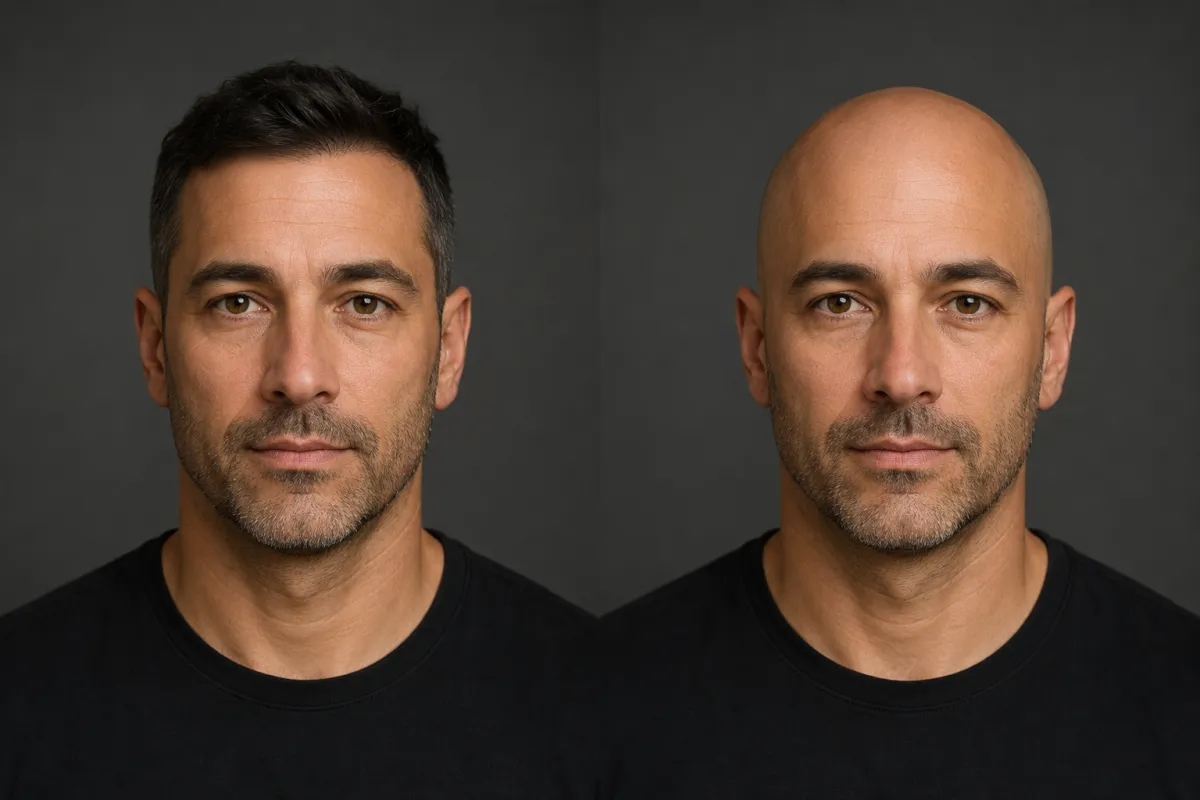
The same photo and lighting, shown with hair and then with a previewed clean-shaven head — so you can judge the look on your own face.
What does a bald filter actually show you?
A bald filter removes the framing that hair normally provides, so the preview is really a preview of your head shape and face, not just a haircut. That's exactly why people want to see it first. A good filter surfaces three things:
| What the filter reveals | Why it matters | What to look for in the preview |
|---|---|---|
| Head shape | A shaved head shows the natural curve and proportions of the skull | The overall silhouette from the front |
| Face without hair framing | Hair softens the jaw and forehead; bald shows them directly | How features read once the hairline is gone |
| Hairline position | The preview follows your real hairline rather than inventing one | Where the line currently sits and how a shaved finish meets it |
This is what people mean when they search for a realistic bald filter — not a cartoon sticker, but a true-to-life read on how a clean-shaven look sits on their own head and face. If you want to compare it against a longer crop first, our guide to the buzz cut filter shows the same selfie at a near-shaved length.
How realistic is an AI bald filter?
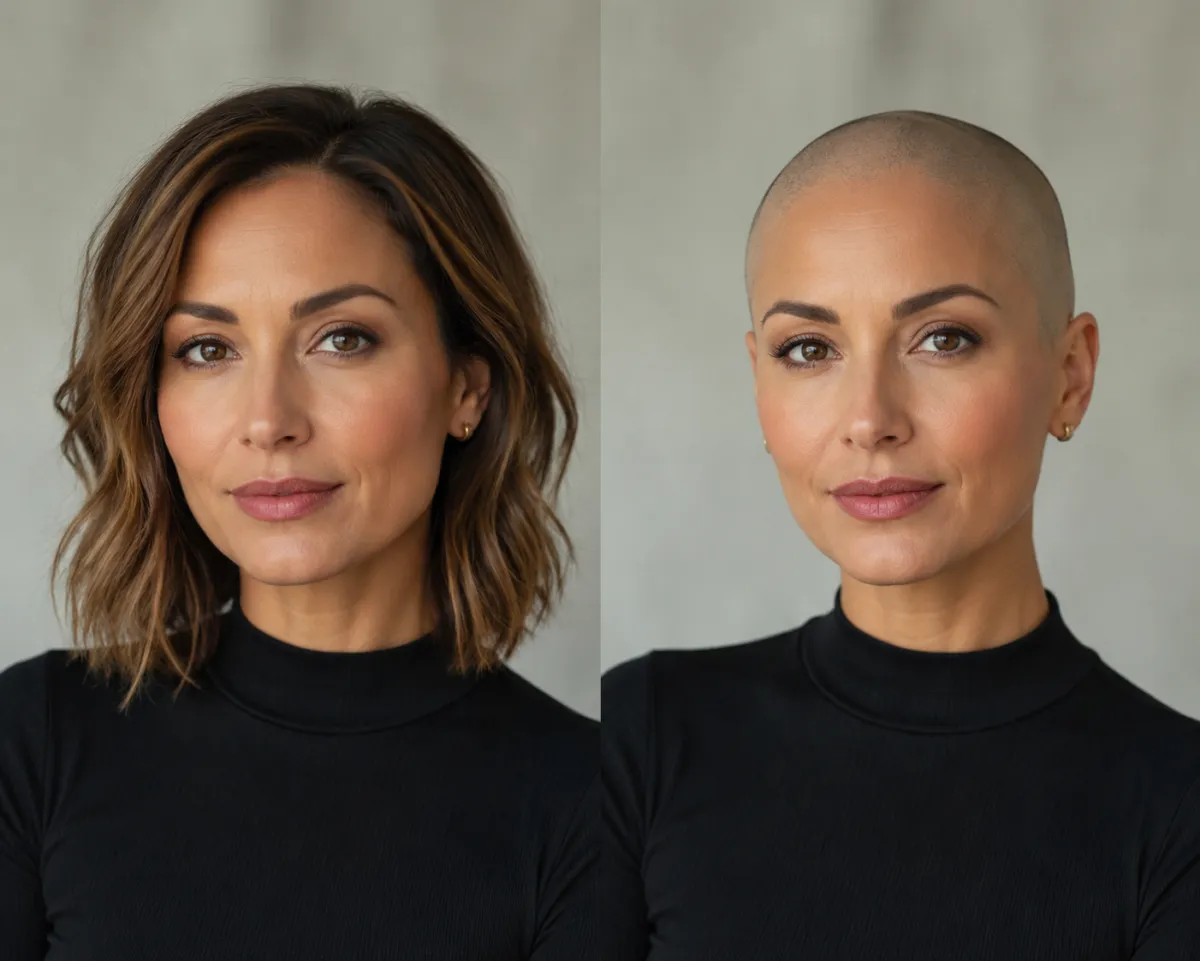
A shaved-head preview for style exploration — the face and lighting stay the same, so the focus is purely on the look.
Modern face-mapping is good enough that a clean selfie usually produces a preview most people would read as a real photo. A few factors move the result up or down:
- Photo quality. Front-facing, even light, hair pushed off the face. Extreme angles, sunglasses, hats, and group shots all reduce accuracy because they hide the hairline and the edges of the head.
- Skin and lighting. A bald preview has to render scalp skin and shadow believably, so soft, even light helps far more than harsh side lighting.
- Stylized vs. photo-real. Social filters (Snapchat, Bitmoji) lean cartoonish; a dedicated AI hairstyle changer aims for photo-real, which is what you want when the whole point is to see the look accurately.
Treat the preview as a strong, honest reference rather than a pixel-perfect guarantee. It exists to help you see the look and decide with more information — never to flatter or to grade your appearance.
Who uses a bald filter, and why?
This isn't only for people about to shave their head. The same neutral preview serves several different jobs:
| Use case | What they want from the filter | Typical question |
|---|---|---|
| Deciding to shave | A realistic look before committing to a razor | "Do I actually want to shave it clean?" |
| Previewing a change in advance | A calm, private look at the result ahead of time | "What will this look like once it's done?" |
| Costume or character | A quick bald look for an outfit or event | "How would a shaved look read for this costume?" |
| Style curiosity | To see a bold look risk-free, just to know | "Could a clean-shaven head suit me?" |
In every case the value is the same: you preview the look on your own face, neutrally and privately, before anything is real.
Bald filter vs. razor vs. a general AI chatbot
People reach for three tools to answer "what would I look like bald?" Here's the honest trade-off:
| AI bald filter | Picking up the razor | General chatbot (ChatGPT / Gemini) | |
|---|---|---|---|
| See it on your own face | ✅ Yes, photo-real | ⚠️ Only after it's done | ⚠️ Often refuses or returns a stranger |
| Speed | Seconds | Minutes, but committed | Slow, inconsistent |
| Cost | Free | Free, but not reversible | Free but unreliable |
| Head-shape match | ✅ Built for it | ✅ It's literally your head | ❌ Not its job |
| Reversible | ✅ It's just a preview | ❌ It grows back slowly | ✅ Preview only |
If you've typed "show me bald" into a general chatbot and watched it stall or hand back someone else's face, that's the gap a purpose-built filter fills: it edits your photo instead of inventing a new person.
Frequently asked questions
How can I see what I would look like bald?
Upload a clear, front-facing selfie to an AI bald filter, choose the clean-shaven look, and it renders a bald preview on your own face in seconds. Because it edits your actual photo, the result keeps your features and lighting, so you can see the look neutrally on your own head. It's a preview to help you decide, not a judgment on your appearance.
Is there a free bald filter?
Yes. You can preview a bald look free in your browser with no download and no account. Just upload a photo on the home page, choose the clean-shaven option, and see the result in seconds. You can generate and compare several previews before you decide on anything.
Does a bald filter work for women too?
Yes. A bald filter works the same way regardless of gender, because it reads your head shape and hairline, not your profile. Plenty of people use it to explore a bold shaved look risk-free before deciding. Upload your selfie and preview the clean-shaven look neutrally on your own face.
Will a shaved head suit me?
A preview is the simplest way to find out for yourself, since it shows the look on your own head shape and features rather than on a model. There's no single rule about who a shaved head suits — it comes down to seeing it. Upload a selfie, view the bald preview neutrally, and judge the look on your own terms.
Does the bald filter work from any selfie?
It works best from a clear, front-facing photo in even light with your hair pushed back from your face. Extreme angles, sunglasses, hats, and busy group shots all reduce accuracy because they hide the hairline and head outline the tool needs to read. If a result looks off, retake the selfie straight-on with better lighting and try again.
How realistic is an AI bald filter?
A clean, front-facing selfie usually produces a preview most people would read as a real photo, because modern face-mapping renders scalp skin, shadow, and head shape believably. Photo quality and even lighting matter most. Treat it as a strong, honest reference rather than a pixel-perfect guarantee — it's there to help you see the look and decide.
Related guides
Keep exploring before you commit to a change:
- Try the free AI hairstyle changer → — upload a selfie and preview a bald look on the home page.
- Hairstyle Try-On: see any haircut on your face
- Buzz Cut Filter: see a near-shaved look on your photo
- What hairstyle suits my face? Find out by face shape
Ready to see the look?
Stop picturing it. Upload a selfie and preview a bald look free → — neutrally, privately, on your own face.