
How to Choose a Hairstyle for Dating Profile Photos
Choose a hairstyle for dating profile photos with a simple, honest preview process for cut, color, framing, and photo consistency.

The best hairstyle for dating profile photos is one that still looks like you in ordinary light, fits the way you wear your hair now, and reads clearly in a head-and-shoulders crop. Use an AI hairstyle changer for a quick hairstyle try on before you take new photos—not to invent a different face, but to narrow down a look you would genuinely wear.
Last updated: July 21, 2026 · about 7 min read
A dating photo has a short job: it should make a recent, recognizable version of you easy to see. Hair can help frame the face, but the most useful choice is rarely the most dramatic one. Think in terms of a small set of options you can maintain, photograph, and show up in comfortably.
Start with the photo, not a trend
Before choosing a cut or color, look at the image you want to replace. Is the problem that the hair covers your eyes? Does the length disappear against a dark top? Does the current color look different under indoor light? Those are photo questions, not reasons to overhaul your appearance.
For most profiles, choose one of three directions and compare it against your current hair:
| Direction | When it helps in a profile photo | What to keep honest |
|---|---|---|
| Face-opening | Hair hides the eyes, brows, or cheekbones | Keep your natural part and hairline visible |
| Shape-defining | Your hair looks flat or loses its outline in a small crop | Choose a cut you can style on an ordinary morning |
| Color-refining | The current shade looks dull or uneven in the intended light | Preview a shade close enough to maintain in real life |
If you are torn between two lengths, it is usually more useful to compare a modest change first: current length, collarbone length, then a bob or shorter cut. The bob filter can make that comparison easier to inspect without committing to a salon appointment.
A profile photo should be recent and recognizably you. A hairstyle preview is a decision aid, not a promise that an edited image will match a salon result exactly.
Use a hairstyle try on as a shortlisting tool
An AI hairstyle try on works best when you give it a plain, current reference photo. Keep the aim narrow: compare hairstyles, then take the actual profile photo after you have chosen a direction.
- Use a clean reference selfie. Choose even light, a front-facing angle, and your normal hair texture. The best selfie guide explains the simple setup that gives a preview less room to guess.
- Test three plausible options. For example: your present style, a softer face-framing option, and one shorter or darker alternative. Do not generate ten unrelated looks; comparison gets less useful when every option changes the person.
- Check the result at profile-photo size. View each option small, then full-screen. Ask whether the eyes are visible, the outline is clear, and the style still feels familiar.
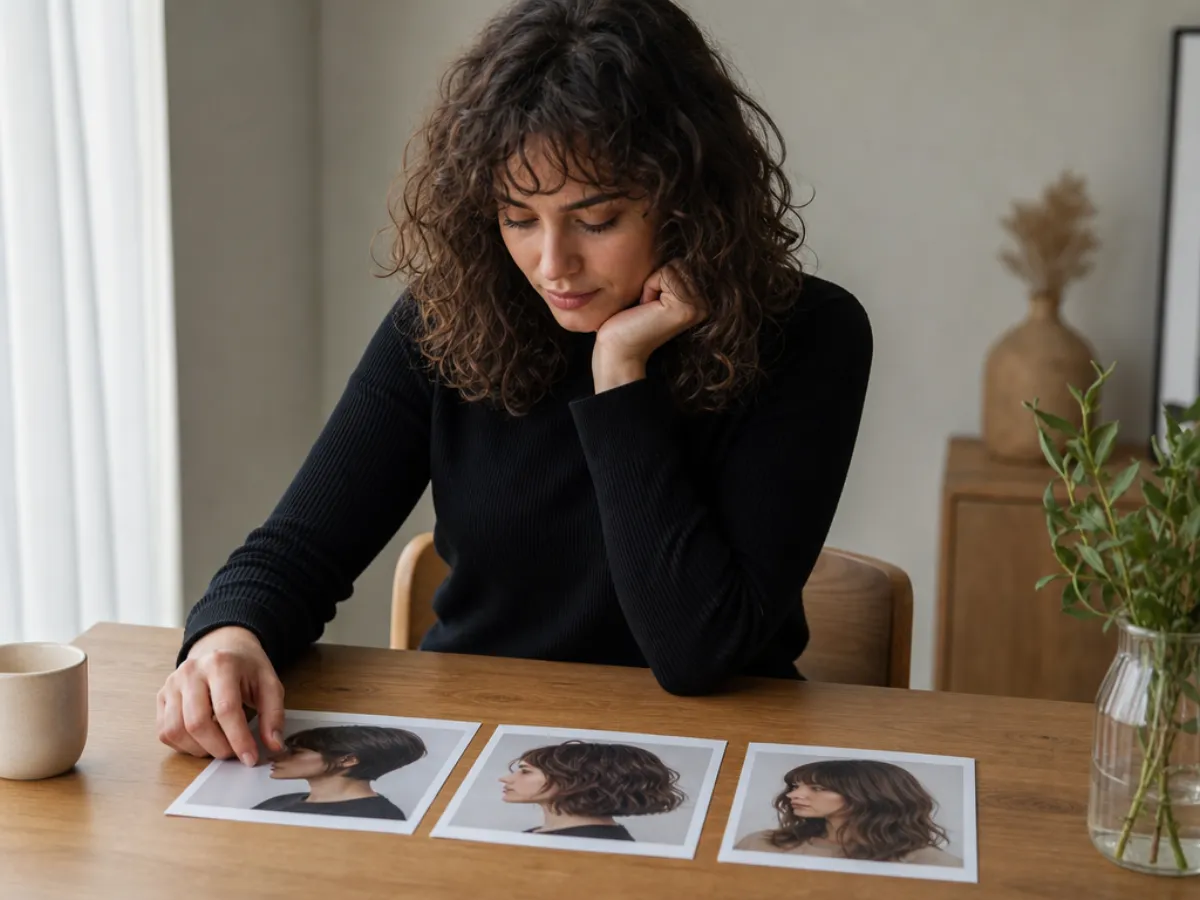
Compare a small, wearable set of directions before you retake the actual photo; the useful question is what still feels like you.
Choose for recognition, not a “better” version of yourself
Dating apps are not an audition for a permanent look. A sharp, styled photo can be fun, but it can backfire if it is the only picture that looks like that. Let your hair complement the photo rather than carry it.
Use this quick check before settling on a hairstyle for dating profile photos:
- Would a friend recognize this as you at a glance?
- Could you recreate it without a special occasion?
- Does it show the features you usually want visible—eyes, brows, curls, or your natural part?
- Does the color still look believable in daylight as well as indoors?
- Would you be comfortable showing up with this hair next week?
If the answer is no, step back to a smaller change. Bangs can be a good face-framing experiment, but they need to sit plausibly with your own hairline; try a bangs filter before making it the main statement of a new photo. For a shade decision, test the idea separately with the AI hair color changer instead of asking one image to solve cut, color, makeup, and lighting at once.
Match hair to the photo setting
The setting changes what reads clearly. You do not need a themed portrait, just enough contrast and light for the hair to have an outline.
| Photo setting | Hair choice to test first | Common issue to avoid |
|---|---|---|
| Outdoor daylight | Your normal texture with soft face framing | Wind-blown hair covering one eye |
| Café or indoor window light | A shape with a visible part or front layers | Dark hair blending into a dark background |
| Casual activity photo | A style you can wear while moving | A formal updo that does not match the activity |
| Evening photo | A clear silhouette and restrained color change | Heavy filters that change skin tone and hair color together |
Take the final photo after the decision, not from the preview itself. A real photo in the place and light where you spend time will do more for trust than a flawless-looking edit.
A simple retake plan
Once you have shortlisted a style, make the photo session uncomplicated:
- Wear something with enough contrast that the hair edge does not disappear.
- Take one natural-light head-and-shoulders photo, one slightly wider activity photo, and one relaxed option with a small smile.
- Keep at least one image close to your current everyday appearance, then replace older profile pictures gradually.
If a hairstyle try on subtly changes your face, eye shape, or skin tone, discard it. That is a rendering limitation, not feedback about what looks good on you. The aim is a more informed haircut or color conversation—not a digitally improved identity.
Frequently asked questions
What hairstyle is best for dating profile photos?
There is no universal best hairstyle. Pick one that keeps your face visible, suits your usual texture and routine, and looks like you in everyday light. A clear, recent photo matters more than a dramatic new cut.
Should I change my hair for a dating profile photo?
Only if you already want a change or the current photo makes it hard to see your face or hair clearly. A small, wearable adjustment is often more useful than a complete makeover for a single image.
Can I use an AI hairstyle preview for a dating photo?
Use a preview to compare haircut or color ideas, then take a real, current photo after you choose a direction. Do not use an AI-edited portrait as a substitute for showing how you look day to day.
Should my dating profile photo show my natural hair color?
It should show a color you currently have or genuinely plan to wear. If you are considering a color appointment, preview a few realistic shades first, then update the photo once the change is real.
Related guides
- Try the free AI hairstyle changer → — compare a few wearable directions on a current selfie.
- Hairstyle try-on: see any haircut on your face
- Best selfie for an AI hairstyle app: seven photo rules
- How would I look with bangs?
- AI hair color changer: test a shade before you dye
Choose a look you can live in
Start with one current selfie, test a small set of realistic options in the AI hairstyle changer, and take the final profile photo after you choose the version that feels most like you. A hairstyle try on is most helpful when it helps you choose a real next step, not when it replaces the photo.