
Non-English AI Hairstyle Prompts: Describe Your Cut Clearly
Write non-English AI hairstyle prompts with clear length, fringe and texture details. Learn what to preserve and how to check your haircut preview.

You can write non-English AI hairstyle prompts in the Describe editor of the AI hairstyle changer. The studio automatically translates detected non-English instructions before creating a hair edit. Describe the cut in plain sentences, name the length and fringe you want, and say what should stay unchanged. Then compare the result with your original photo; translation does not guarantee an accurate haircut.
Last updated: October 6, 2026 · about 8 min read
How do non-English instructions work in the studio?
You do not need to translate a full request yourself before entering it. The Describe workflow accepts your instructions and handles detected non-English wording automatically. English instructions can be entered as usual. If translation cannot be completed, the studio keeps the original instructions rather than making translation a prerequisite for the edit.
This is a convenience for describing a haircut, not a promise that every language, dialect, abbreviation, or salon nickname will be interpreted correctly. A short borrowed word can be ambiguous. A mixed-language sentence can leave too little context. Use a complete request in the language you know best instead of a string of isolated style labels.
The useful result is a picture that answers your hair question. You may know exactly what you mean by a local term but still need to describe its shape: where the ends sit, whether the forehead remains visible, and how the sides connect to the rest of the hair. Those details help even when you write entirely in English.
What should a clear haircut request contain?
Build the request around one change and a few visible details. Length, outline, texture, and fringe density do different jobs. A request for a short cut does not explain whether you want the ears covered; a request for soft bangs does not explain whether they should touch the eyebrows.
| Detail | A useful description | Why it helps the comparison |
|---|---|---|
| Overall length | Ends near the chin, with the neck visible | Gives the cut a visible boundary |
| Front section | Light separated fringe ending near the eyebrows | Defines coverage as well as length |
| Sides | Longer front pieces blending into the existing hair | Avoids treating the fringe as a detached strip |
| Texture | Keep the existing waves and natural volume | Limits an unwanted styling change |
| Preservation | Keep face, hair color, glasses, clothing, and background unchanged | Makes the hair change easier to judge |
Treat these as descriptions, not exact cutting instructions. Chin-length in a photograph depends on pose, and a fringe that looks brow-skimming in a still image may behave differently on moving, textured hair. A stylist can discuss real length and shrinkage after examining your hair.
If you cannot tell whether the result followed your request, simplify the request before adding more adjectives. One clear change is easier to inspect than five simultaneous changes.
How do you preview a cut in three steps?
- Choose a photo that exposes the relevant hair. Use even light and a clear view of the forehead, hairline, sides, and ends. Keep the camera near eye level. If glasses are part of your everyday appearance, leave them on and avoid a reflection that hides your eyes. A cropped photo cannot reliably show the full outline of a longer cut.
- Write the requested change in Describe. Start with the haircut, then name its length, fringe, and texture. Finish with the details to preserve. For a fringe experiment, the bangs filter offers a focused starting direction; use your description to explain the coverage you mean.
- Compare the image with your original. Check the hair first, then the unchanged features. If the cut is wrong but your face is stable, revise one hair detail. If your face, glasses, or photo framing changed substantially, reject that result as a comparison and try a clearer source photo.
You do not need a new source image for every nearby haircut idea. Keeping the original photo fixed makes differences easier to read. Save your request in a personal note so that a later variation changes only the instruction you intended to change.
How can you write examples without losing the meaning?
The following examples express the same fringe decision in Spanish, French, and English. They are suggested wording, not tested results or a guarantee of identical outputs. Adapt them to your own hair and preferred way of speaking.
Spanish example:
Añade un flequillo ligero con mechones separados que lleguen a las cejas. Mantén el largo y el color de mi cabello, mi rostro, mi expresión, mi ropa y el fondo sin cambios.
French example:
Ajoute une frange légère avec des mèches séparées qui arrivent aux sourcils. Garde la longueur et la couleur de mes cheveux, mon visage, mon expression, mes vêtements et le fond inchangés.
English meaning:
Add a light fringe with separated strands ending at the eyebrows. Keep my hair length and color, face, expression, clothing, and background unchanged.
Notice that the examples describe a shape rather than asking for a transformation into a different person. They specify both the added fringe and the existing hair that should remain. If you want a shorter cut instead, replace the fringe sentence with your length and outline request. The bob haircut filter is relevant when the decision is a shorter overall silhouette rather than forehead coverage.
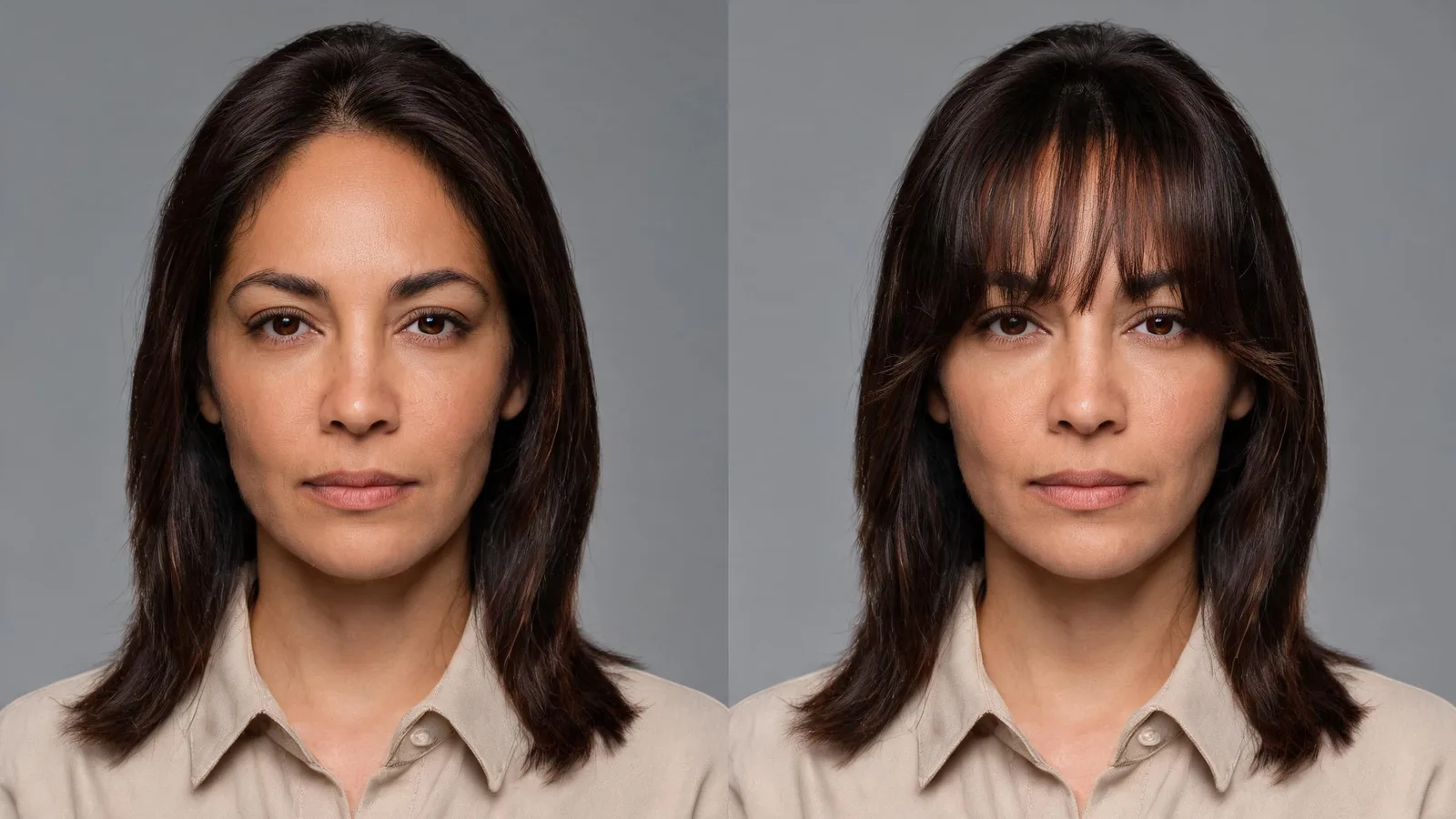 Editorial illustration: the comparison isolates a fringe change. The images in this guide are conceptual examples, not customer results or evidence of translation accuracy.
Why can a haircut term still produce the wrong shape?
Hair vocabulary varies between languages, regions, and individual salons. Even English uses different everyday terms: the words bangs and fringe can describe the same front section of hair. Spanish flequillo and French frange are useful terms for the examples above. A familiar word helps, but it still leaves density and length unspecified.
A style nickname can be less precise than that basic vocabulary. Instead of relying entirely on a name such as butterfly cut, describe the features you want: shorter face-framing layers, longer ends, and your existing overall length. If you mean light fringe, describe separated strands and visible forehead rather than asking only for thin bangs.
Technical translation guidance also recognizes that context matters. Microsoft's glossary documentation discusses context-specific terminology and ambiguous words. That is a general translation principle; the hairstyle studio does not provide a user glossary setting. Your practical option is to add a short shape description directly to the request.
Avoid putting several incompatible names in one sentence. A request for blunt, wispy, curtain, and micro bangs gives competing instructions about the same front section. Choose one direction and define it. If your preferred salon term is important, keep it beside a plain explanation rather than expecting the name alone to carry the entire request.
What should you change after an unclear result?
First identify the mismatch. If the fringe became too dense, ask for more separation and visible forehead. If it sits too low, ask for the ends to stop above the eyes or closer to the eyebrows. If the whole haircut changed when you wanted only bangs, repeat that the remaining hair length and outline should stay unchanged.
Keep corrections small. Changing the language, source photo, color, cut, and lighting at once prevents a useful comparison. Reuse a clear photo and revise the one sentence that controls the problem. You can also rewrite the request in shorter sentences, avoiding slang and contradictory instructions.
If you are primarily comparing colors, use the AI hair color changer and separate that decision from the haircut. A shorter silhouette and a darker color can each change how the hair appears around your face. Combining them makes it hard to identify which change you prefer.
Our AI hairstyle prompt examples offer more ways to specify a controlled edit. Use them as a structure, then write the details naturally in your own language. More words are useful only when they resolve a specific uncertainty.
How do you check that the preview is worth keeping?
Read your request beside the image. Can you point to the requested length, density, and texture? Are the roots connected plausibly to the hairline? Have your expression, face outline, ears, and any glasses stayed recognizable? Look at the full photograph as well as a close crop around the forehead.
A polished image can still fail this check. Smoother skin, different eyes, or an altered head angle may make a haircut look different without answering the original question. Keep the comparison that preserves the source photo most convincingly, rather than choosing on overall attractiveness alone.
Editorial disclosure: AIChangeHair provides visual hairstyle previews. This guide explains its Describe workflow and practical ways to phrase requests; it does not report a controlled multilingual accuracy test. A preview cannot predict your hair's condition, growth pattern, styling effort, or a stylist's final cut. Bring the original photo, a stable preview, and a short description to your appointment.
Frequently asked questions
Can I enter a hairstyle prompt in another language?
Yes. The Describe workflow automatically translates detected non-English instructions for a hair edit. Use clear sentences with visible length, fringe, and texture details; not every language, dialect, or short term is guaranteed to be interpreted correctly.
Do I need to translate my haircut request into English first?
You do not need to translate the full request yourself. Write in the language you are comfortable using and explain ambiguous style names with plain descriptions of the shape you want.
What happens if automatic translation fails?
The studio keeps your original instructions rather than requiring translation to complete. Check the resulting haircut against your request and simplify unclear wording if the preview misses the intended change.
Will the same prompt in two languages produce identical hair?
Identical results are not guaranteed. Translation and image generation can introduce differences. Compare each preview with the original photo and judge the requested hair details and preserved facial features.
Related guides
- Try the AI hairstyle changer →
- Bangs filter
- Bob haircut filter
- AI hair color changer
- AI hairstyle prompt examples
- How to bring a haircut preview to a salon
Describe one change, then check it
Open the AI hairstyle changer, use the language you are comfortable writing, and name the hair details that matter. Keep a preview only when you can explain what changed and what stayed the same.