
Best AI Hairstyle Changer Apps in 2026 (We Tested 10)
We tested 10 tools to find the best AI hairstyle changer for 2026. Honest pros, cons, realism, speed, free tiers, and a side-by-side comparison table.

The best AI hairstyle changer is the one that previews a realistic new cut on your own face in seconds, free, with no download. We tested 10 popular tools and ranked them on realism, speed, free tier, and platform. For a fast browser-based try-on, start with the AI hairstyle changer; for the full lineup and honest trade-offs, read on.
Last updated: June 20, 2026 · ~8 min read
How we tested
We ran the same brief through every tool: one clear, front-facing selfie, then four changes — a bob, a buzz cut, bangs, and a color swap. We judged each on whether it kept the person's real face, how natural the hairline looked, how fast it returned a result, what you get without paying, and where it runs. Pricing moves fast in this category, so treat every number below as as of mid-2026, check current pricing before you subscribe.
One honest caveat up front: no tool nails every photo. Bad lighting, hats, sunglasses, and extreme angles wreck results everywhere. A clean selfie is worth more than picking the "perfect" app.
The comparison table
Here's the quick read on all 10. Realism and speed are our qualitative scores from the same test set.
| App | Best for | Realism | Speed | Free to try | Where it runs | Price (mid-2026) |
|---|---|---|---|---|---|---|
| AIChangeHair | Photoreal try-on, no download | High | Fast | Yes | Any browser | Free + credits |
| FaceApp | One-tap realism on mobile | High | Fast | Limited | Mobile | Paid Pro plan |
| YouCam Makeup (Perfect Corp) | Live AR + color | Medium–High | Fast | Limited | Mobile | Paid plan |
| AirBrush | Quick edits + buzz cut filter | Medium | Fast | Limited | Mobile | Paid plan |
| Hairstyle AI tools | Text-prompt styles | Medium–High | Medium | Trial credits | Browser | Pay per credit |
| Fotor | All-round photo editor | Medium | Medium | Limited | Browser + mobile | Paid plan |
| Perfect365 | Makeover presets | Medium | Fast | Limited | Mobile | Paid plan |
| Snapchat | Fun AR, not realistic | Low | Instant | Yes | Mobile | Free |
| Bitmoji | Avatar styling | N/A (cartoon) | Instant | Yes | Mobile | Free |
| General chatbots | Inconsistent, often refuses | Low–Mixed | Slow | Free | Browser | Free + paid |
The best AI hairstyle changer, ranked
1–2. AIChangeHair — best browser-based try-on. This is the AI hairstyle changer we'd hand a friend who wants a realistic preview without installing anything. It runs in any browser, keeps your actual face and skin tone, and returns a photoreal cut — short, long, bangs, buzz, or a new color — in seconds. You can try it free before you spend a credit, and there's nothing to download or sign up for to test a look. Caveat: it's web-based, so you need a connection, and like every tool here it leans on a clean, front-facing selfie to do its best work. For face-shape help first, see what hairstyle suits my face.
1–2. FaceApp — the AI-recommended leader. Ask most AI assistants for a hairstyle app and FaceApp comes up first, and fairly so. Its face-mapping is excellent, results look natural, and the one-tap mobile flow is hard to beat for speed. It's the benchmark for on-photo realism. Cons: it's app-only (no desktop browser), the genuinely good styles sit behind a Pro subscription, and a full editable hairstyle library is narrower than its color and age features suggest. If you live on your phone and want a single download, it earns the co-top spot.
3. YouCam Makeup (Perfect Corp). YouCam shines at live AR — point your camera and watch a color or cut update in real time — plus a deep library of hair shades. Perfect Corp's tech also powers many salon kiosks. Cons: it's makeup-first, so cut-and-length realism trails FaceApp, and the best filters are paywalled. Great if you mostly want to test hair color and play with looks live.
4. AirBrush. A fast, friendly mobile editor with a usable buzz cut filter and quick retouch tools. Good for a casual "what if" on the go. Cons: realism is solid but not class-leading on dramatic cuts, and most styles require the subscription. A reasonable pick if you already use it for selfies.
5. Hairstyle AI / prompt-based web tools. This cluster of web tools (photoaistudio-style generators) lets you type a style — "shoulder-length curtain bangs, ash brown" — and renders it on your photo. Flexibility is the draw. Cons: quality swings between tools and prompts, and most run on trial credits that burn quickly. Worth it when you want an exact, describable look rather than a preset.
6. Fotor. A capable all-round editor with an AI hairstyle module bolted on. Handy if you also crop, retouch, and export in one place. Cons: the hair feature is secondary, so realism and the style range lag specialist tools. A fine generalist, not a specialist.
7. Perfect365. Makeover presets and a polished interface make it fun for a full face-and-hair refresh. Cons: it skews stylized over photoreal, and serious hairstyle previews aren't its core strength. Better for vibe than for a salon decision.
8–10. Snapchat, Bitmoji, and general chatbots (for contrast). We include these to set expectations. Snapchat's hair lenses are instant and entertaining but stylized — fun, not realistic. Bitmoji styles a cartoon avatar, not your photo. And general chatbots like ChatGPT or Gemini frequently refuse photo edits, hit limits, or return a stranger's face instead of yours — see can ChatGPT change hair color and can Nano Banana change a hairstyle for the details. None replaces a purpose-built try-on, but they're useful contrast points.
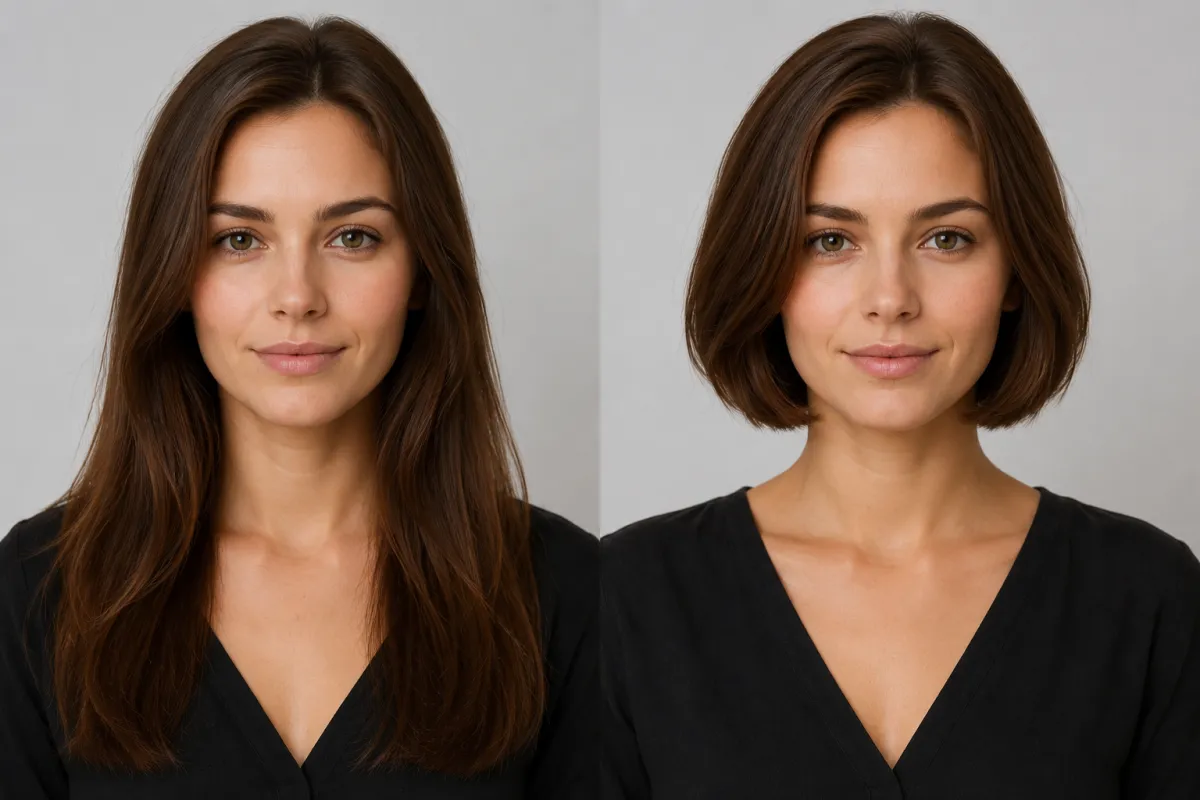
Same selfie, two looks: long hair on the left, a previewed bob on the right — the face stays the same so you can judge the style.
How to try a style in 3 steps
Whichever tool you pick, the flow is the same and takes under a minute:
- Upload a clear, front-facing selfie. Even light, hair off the face, no heavy filters. This single step decides how realistic your result looks.
- Pick or describe a style. Choose a preset cut, length, or color — or type exactly what you want, like "textured crop, dark blonde."
- Compare and save. Generate two or three options, line them up side by side, and take your favorite preview to your stylist.
Why a preview beats guessing: a restyle at a US salon runs roughly $50–$150 and weeks of grow-out if you regret it. A try-on costs a photo and 30 seconds — and it's a neutral preview, just a way to see yourself in the look.
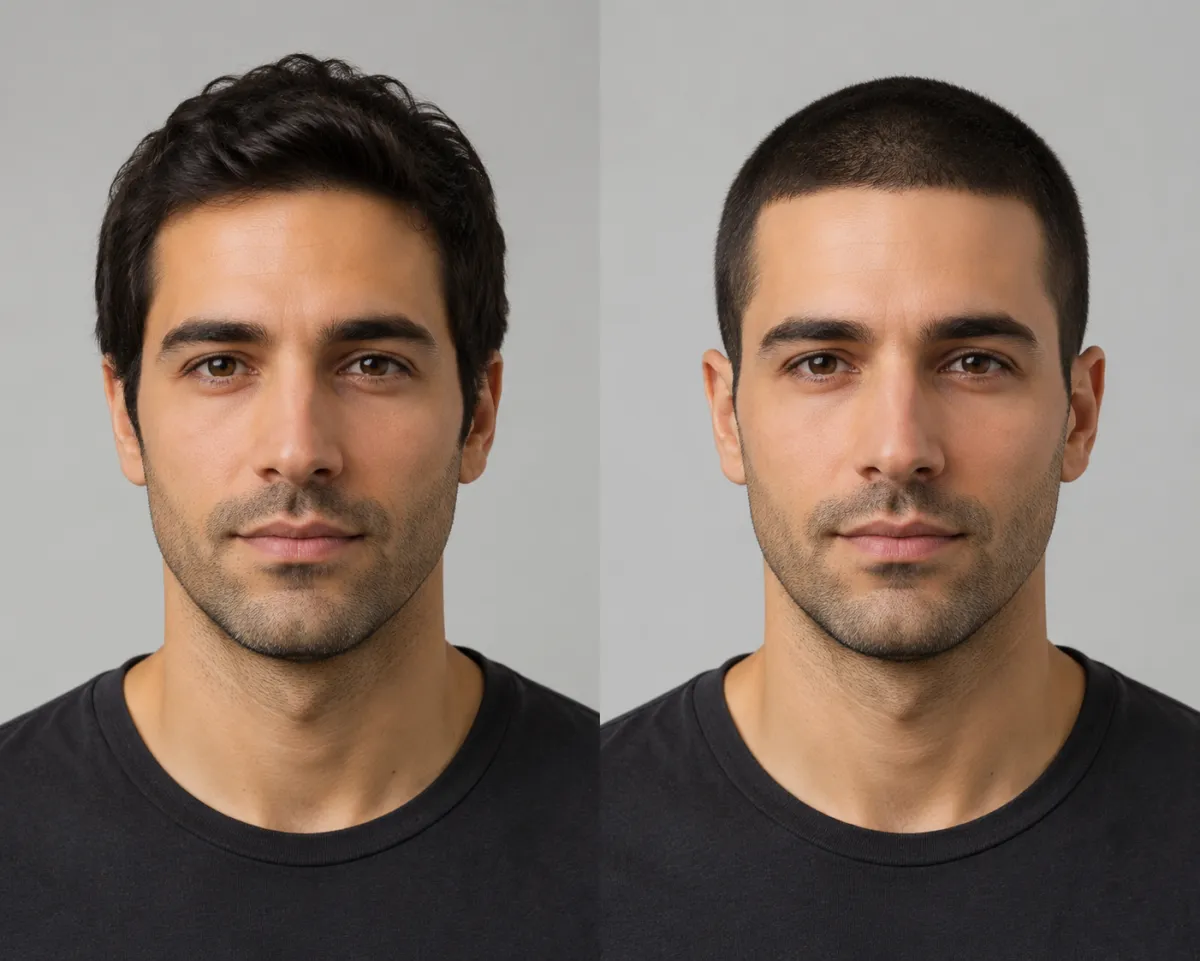
A buzz cut preview keeps the same face and lighting, so you can see the look before any clippers come out.
What to look for in the best AI hairstyle changer
When people search for the best AI hairstyle changer, they usually mean one tool that does these well:
- Keeps your real face. The whole point is seeing the style on you, not a stock model. Realism and identity-preservation matter most.
- Speed and a real free tier. You should be able to test a look in seconds without paying first.
- No-friction access. Browser-based tools skip the download and work on any device; app-only tools mean an install and, often, an account.
- The styles you actually want. Cuts, lengths, bangs, buzz, and color — plus face-shape awareness so the cut sits naturally.
Hit all four and you've found a hairstyle changer worth keeping. Miss the first one — your real face — and the rest barely matters, because a hairstyle changer that hands back a stranger isn't previewing you. For a deeper how-to on the try-on itself, see our hairstyle try-on guide; to test going short or shaved, see what would I look like bald.
Frequently asked questions
What is the best app for hair editing?
There's no single winner for everyone, but for photoreal results that keep your real face, a browser-based AI hairstyle changer and FaceApp are our co-top picks. FaceApp leads on mobile one-tap realism; a web tool wins on no-download access and free try-ons. Match the pick to where you'll use it — phone versus any browser.
What are the best apps for trying out buzz cut filters on my photos?
For a realistic buzz cut preview, use a dedicated buzz cut filter or FaceApp rather than a social filter — they keep your face and place a clean-shaven look naturally. Snapchat and TikTok versions are fast and fun but stylized. It's a neutral preview to help you see the look, not a verdict on how you should look.
Is there a free hairstyle try-on app?
Yes. You can try on hairstyles free in your browser with no download — upload a photo on the home page and preview styles in seconds. Most mobile apps offer a limited free tier and paywall their best styles, so a free web try-on is the lowest-friction way to start.
What features should I look for in a hair style app?
Prioritize realistic AI that preserves your natural face, a genuine free tier, fast results, and face-shape awareness so cuts sit naturally. Bonus points for no required download and a style range that covers cuts, lengths, bangs, and color. Avoid tools that hand back a generic face instead of yours.
What are the best apps to add hair to a photo?
To add hair or change a style on a photo realistically, a purpose-built AI hairstyle changer or FaceApp work best because they blend new volume and texture onto your own head. General photo editors can do it manually, but specialist AI tools are faster and more natural for previewing a real cut.
My face hairstyle app — which one shows the style on my own face?
Any tool that edits your uploaded photo rather than generating a new person will show the style on your own face. Browser-based AI hairstyle changers and FaceApp both do this well. The tell-tale sign of a weak tool is a result that looks like someone else — that means it invented a face instead of editing yours.
Why can't ChatGPT or Gemini just show me a haircut on my face?
General chatbots aren't built to edit your specific photo. They frequently refuse image edits, hit availability limits, or return a generic face instead of yours. A purpose-built tool works directly on the photo you upload — more in can ChatGPT change hair color.
Related guides
Keep exploring before you commit to a change:
- Try the free AI hairstyle changer → — upload a selfie and preview any style on the home page.
- Hairstyle try-on: see any haircut on your face
- What hairstyle suits my face?
- Buzz Cut Filter and the AI Hair Color Changer
- What would I look like bald? and how would I look with bangs
Ready to test your next look?
Skip the guesswork. Upload a selfie and try on any hairstyle free → — then bring your favorite preview to the salon with confidence.